Delegation
The new WF engine supports two types of delegation:
Delegations are used to replace the approver of a task with another user. Delegations can be used for any task type.
Task delegation documentation, including procedures and behavior description, is available here (this documentation is shared by the new and original WF engine).
The following section mainly describes the differences between delegation in the original Activiti engine and delegation in the native WF engine.
Permissions
Example of role permissions with the option to delegate tasks that I can see:
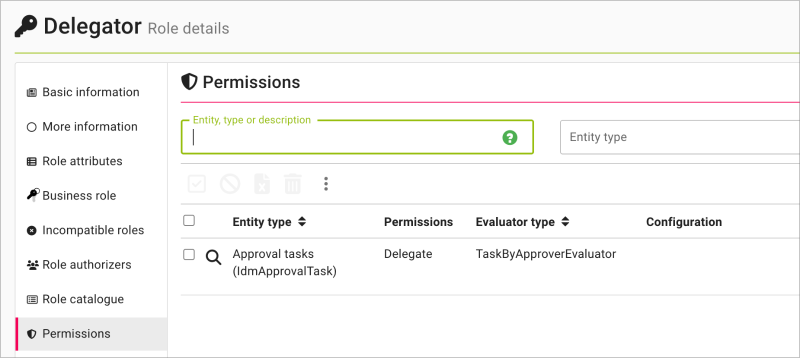
Task visibility permission is provided by evaluators for IdmApprovalTask. More information about their configuration is available here.
Original WF (Activiti)
| Aspect | Detail |
|---|---|
| Permission | WORKFLOWTASK_READ - anyone who can read the task |
| Delegator selection (from user) | IDENTITY_ALLOW_DISABLED_SELECT - autocomplete also includes disabled identities |
| Delegate selection (to user) | IDENTITY_SELECT - autocomplete includes only active identities |
| Validation | The delegator must be CANDIDATE or ASSIGNEE in Activiti identity links |
| User selection restrictions | None |
New native WF engine
| Aspect | Detail |
|---|---|
| Permission | APPROVALTASK_DELEGATE separate permission for APPROVALTASK |
| Delegator selection (from user) | IDENTITY_ALLOW_DISABLED_SELECT - autocomplete also includes disabled identities |
| Delegate selection (to user) | IDENTITY_SELECT - autocomplete includes only active identities |
| Validation | The old approver must exist in the IdmApprovalTaskApprover table. The old approver and the new approver must be different users. |
| User selection restrictions | None |
Delegation history display
It is now possible to display the delegation history directly in the following agendas:
- All task (WF),
- Task for approval (WF),
- Assigned tasks (WF) - dashboard,
- task detail.
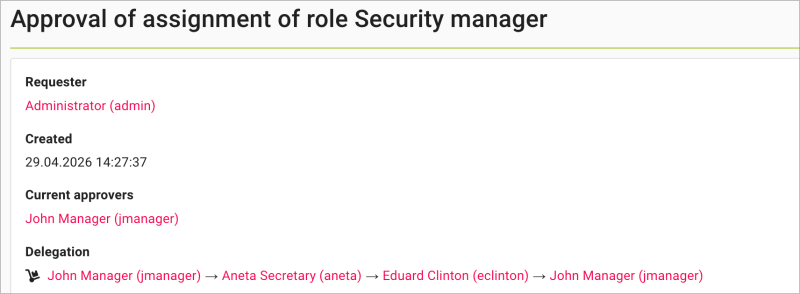
In tables, the "Delegation" column shows the "Dolly" icon  only when the task is delegated. In other cases, the icon is not displayed.
After clicking the icon, the delegation history is displayed in a modal window. Example:
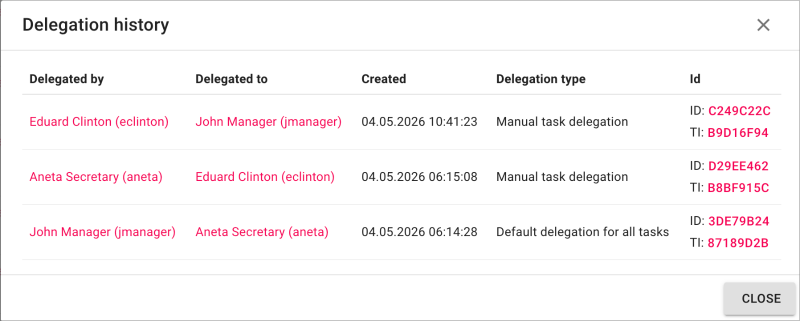
The modal window displays the following columns: Delegated by, Delegated to, Created and Delegation type (e.g. default-delegation-type for automatic delegations, manual-task-delegation-type for manual delegations).
In the task detail, the "Delegation" section shows the full delegation path again, including the option to display the complete delegation history overview in a modal window. Example: