

Technical Account Module - Technical Accounts
Overview
A technical account (service account) is a non-personal account on a target system which an application, a script or a service uses to authenticate itself and to obtain the permissions it needs for its work. Nobody logs in with it interactively, it does not belong to a person - instead it has a guarantor (or guarantors) that are responsible for it.
In the IdM, a technical account is always paired with a real account on a target system (AccAccount) and is optionally owned by a technical asset (see here)- the application or information system the account works for. Two kinds of people are responsible for it:
- Technical Account Guarantor: the person who answers for this particular account. The guarantor requests its permissions, approves changes to them and confirms that the account is still needed. Guarantors are defined per account, either directly by identity or by role - anybody who is granted the configured role becomes a guarantor of the account.
- System Owner: the owner of the target system on which the account lives.
Purpose
- Register every service account in the organization so that none of them remains anonymous
- Name a responsible guarantor for each account, either by identity or by role
- Manage the validity and the lifecycle state of the account
- Assign permissions (roles) to the account itself instead of to a person
- Provision the account and its permissions to the target system, or synchronize them back from it
- Support bulk onboarding via CSV import and approval of account creation
Supported operations on Technical Accounts in IdM
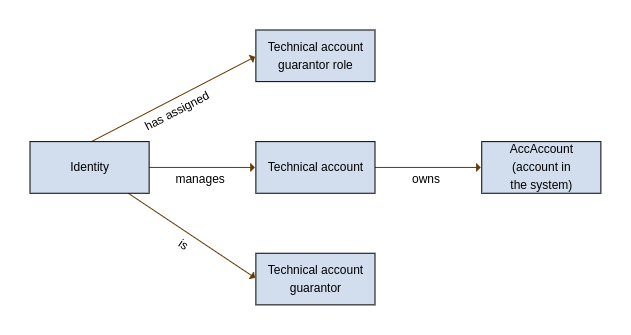
Operations that can be performed with technical accounts within IdM:
- CREATE of a technical account in the target system via a wizard in IdM.
- BULK IMPORT of technical accounts from a CSV file via the Import technical accounts from CSV Long Running Task. @since 15.2.0
- UPDATE of managed attributes (e.g., description, extended attributes, etc.) and their propagation to the end system.
- MEMBERSHIP on the target system for the given technical account, controlled through IdM.
- Approving of role request in IdM for the technical account – the process may be subject to approval, for example by the role guarantor, etc.
- CHANGE PASSWORD of the technical account.
- Assig guarantor in the IdM to the technical account – the guarantor then gains the authorization to perform the listed operations.
- Report of all managed technical accounts in IdM in .xls (Excel) format.
The technical account serves as the owner of the account in the target system. This allows you to manage it without having an identity which owns it.
Lifecycle of technical account
A technical account can either be created by synchronization from a system, by a wizard manually, or in bulk by the Import technical accounts from CSV Long Running Task (@since 15.2.0) — useful for migrating many accounts at once. Technical accounts can be managed via standard provisioning mapping but some attributes will require manual management.
Two processes ensure the state of technical account:
- EndTechnicalAccountProcess invalidates technical accounts where validTill already past,
- StartTechnicalAccountProcess will validate them if date is between validFrom and validTill.
Entities
ER Diagram
┌ ─ ─ ─ ─ ─ ─│ TechnicalAsset │
│ └────────────────┘
▼
┌──────────────────┐
│ TechnicalAccount │
└──────────────────┘
│
│ ┌───────────────────────────┐ ┌─────────────┐
├─────►│ TechnicalAccountGuarantee │─────►│ IdmIdentity │
│ └───────────────────────────┘ └─────────────┘
│
│ ┌───────────────────────────────┐ ┌─────────┐
├─────►│ TechnicalAccountRoleGuarantee │─────►│ IdmRole │
│ └───────────────────────────────┘ └─────────┘
│
│ ┌──────────────────────────┐ ┌────────────┐
└─────►│ TechnicalAccountAccount │─────►│ AccAccount │
└──────────────────────────┘ └────────────┘
│
│ ┌──────────────────────────┐ ┌─────────┐
└─────►│ AccAccountRoleAssignment │─────►│ IdmRole │
└──────────────────────────┘ └─────────┘
Key Attributes
| Attribute | Type | Description |
|---|---|---|
| id | UUID | primary identifier |
| code | String | business identifier of the account - the identifier the account has on the target system. Unique per system, not globally; see Code uniqueness |
| externalCode | String | name of the account; unique across all systems, or empty |
| description | String | account description |
| disabled | Boolean | flag indicating whether the account is disabled |
| state | TechnicalAccountState | lifecycle state of the account - CREATED, VALID or INVALID; see Account state and validity |
| validFrom | LocalDate | validity start date |
| validTill | LocalDate | validity end date |
| externalId | String | identifier assigned by an external system for integration purposes |
| technicalAsset | UUID | optional technical asset the account belongs to |
TechnicalAsset
The technical asset is the logical owner and umbrella element of technical accounts - the application or information system the account works for. Pointing a technical account at an asset is optional - the accounts can function without an asset. The asset carries the guarantors and holders, and through the product-provided asset roles they also get access to the technical accounts underneath it. See more here.
Technical account creation with/without technical asset
When creating a technical account via the wizard, the first step allows you to select the technical asset to which the technical account belongs. By default, an administrator can create a technical account without selecting a technical asset, whereas all other users are required to fill it in. This behavior can be modified using two configuration properties:
- idm.pub.tech.techAccountWizard.accountWithoutAssetForAdmin: Setting this to false enforces that even administrator must select a technical asset.
- idm.pub.tech.techAccountWizard.accountWithoutAssetRoles: By populating this property with role UUIDs (multiple UUIDs can be comma-separated), users with any of these roles assigned will be allowed to create technical accounts without specifying a technical asset.
When the user is not allowed to leave the technical asset empty, the wizard fails with result code CANNOT_CREATE_TECHNICAL_ACCOUNT_WITHOUT_TECHNICAL_ASSET.
Permissions
| Permission | Description |
|---|---|
| ADMIN | all permissions |
| COUNT | permission to retrieve the count of entities |
| AUTOCOMPLETE | permission to display the entity in autocomplete suggestions |
| READ | permission to read the entity |
| READLIMITED | permission to read a limited set of the entity attributes |
| CREATE | permission to create the entity |
| UPDATE | permission to edit entity attributes |
| DELETE | permission to delete the entity |
| ADDROLE | permission to assign a role to the given technical account |
| REMOVEROLE | permission to remove an assigned role from the given technical account |
| CHANGEPERMISSION | permission to create a role request for the given technical account |
Evaluators
| Evaluator | Type | Description | Attributes |
|---|---|---|---|
| TechnicalAccountByGuarantorEvaluator | Regular | Returns technical accounts where the logged user is a guarantor - either directly by identity or indirectly by role. | No attributes |
| TechnicalAccountByGuarantorTransitiveEvaluator | Transitive | Returns technical accounts where the logged user has access to their guarantors. Permissions are transitively derived from the guarantor identities of the account - both the direct ones and the identities holding one of its guarantor roles. | Transfer permissions - a list of permissions to be transferred from the guarantor identities to their technical accounts; if the list is empty, all permissions held by the user for the given guarantor will be transferred |
| TechnicalAccountBySystemOwnerEvaluator | Regular | Returns technical accounts on systems where the logged user is a system owner - either directly by identity or indirectly by role. The system is resolved through the account linked to the technical account. | No attributes |
| TechnicalAccountByGuaranteedRoleEvaluator | Regular | Returns technical accounts which have a role assigned whose guarantor is the logged user - either directly by identity or by holding the guarantor role of that role. | No attributes |
| TechnicalAccountByTechnicalAssetGuarantorEvaluator | Regular | Returns technical accounts where the logged user is a guarantor of the parent technical asset - either directly by identity or indirectly by role. Technical accounts without an assigned technical asset are never matched by this evaluator. | No attributes |
| TechnicalAccountByTechnicalAssetHolderEvaluator | Regular | Returns technical accounts where the logged user is a holder of the parent technical asset - either directly by identity or indirectly by role. Technical accounts without an assigned technical asset are never matched by this evaluator. | No attributes |
| TechnicalAccountByTechnicalAssetTransitiveEvaluator | Transitive | Returns technical accounts where the logged user has access to the parent technical asset. Permissions are transitively derived from the technical asset the technical account belongs to. Technical accounts without an assigned technical asset are never matched by this evaluator. | Transfer permissions - a list of permissions to be transferred from a technical asset to its technical accounts; if the list is empty, all permissions held by the user for the given technical asset will be transferred to its technical accounts |
Two more evaluators reach out of the technical account, so that a user who may manage the account may also manage the role requests created for it:
| Evaluator | Target entity | Type | Description | Attributes |
|---|---|---|---|---|
| RoleRequestByTechnicalAccountEvaluator | IdmRoleRequest | Transitive | Returns role requests whose applicant is a technical account the logged user has access to. When CHANGEPERMISSION is available on the technical account, CREATE, UPDATE and DELETE are granted on the role request. | Transfer permissions - a list of permissions to be transferred from the technical account to its role requests |
| RoleRequestByTechnicalAccountGuarantorEvaluator | IdmRoleRequest | Regular | Returns role requests on technical accounts where the logged user is a guarantor - either directly by identity or indirectly by role. | No attributes |
Technical account CSV import
To create/update many technical accounts at once, IdStory IdM provides a long running task that can import them from a CSV file. You can read more about this task here
Account state and validity
Besides the disabled flag, every technical account carries a lifecycle state:
| State | Description |
|---|---|
| CREATED | the account has been created but its validFrom has not arrived yet |
| VALID | the account is within its validity period |
| INVALID | the account is past its validTill |
| Task | Description | Default cron |
|---|---|---|
| Validates technical account if it is in valid date range (StartTechnicalAccountProcess) | Moves accounts which are enabled, in state CREATED and already within their validity period to VALID. | 0 30 0 ? * * (daily at 00:30) |
| Invalidates technical account if it is past till date (EndTechnicalAccountProcess) | Moves accounts which are enabled, not yet INVALID and past their validTill to INVALID. | 0 30 0 ? * * (daily at 00:30) |
Both tasks are registered with the daily trigger during module initialization and can be re-scheduled or executed manually in the Scheduled tasks agenda. Disabled accounts are skipped by both of them.
Code uniqueness
The code of a technical account is unique per system, not globally - the same code may exist on two different systems, which is what you want for an account like svc-backup that exists in AD and in the HR system at the same time. The rule is enforced on two places, because neither of them alone sees the whole picture:
- on save of the technical account - the system is known from the wizard when the account is being created, and from the existing links when the code of an existing account is being changed,
- on creation of the link between the technical account and an account on the target system - this catches the "create the technical account first, link it later" path.
A violation is reported with result code TECHNICAL_ACCOUNT_ALREADY_EXISTS_ON_SYSTEM:
The externalCode (the Name of the account) is validated differently - it has to be unique across all systems, or empty, in which case the validation is skipped. A duplicate is reported with result code DUPLICATE_TECH_ACCOUNT_NAME.
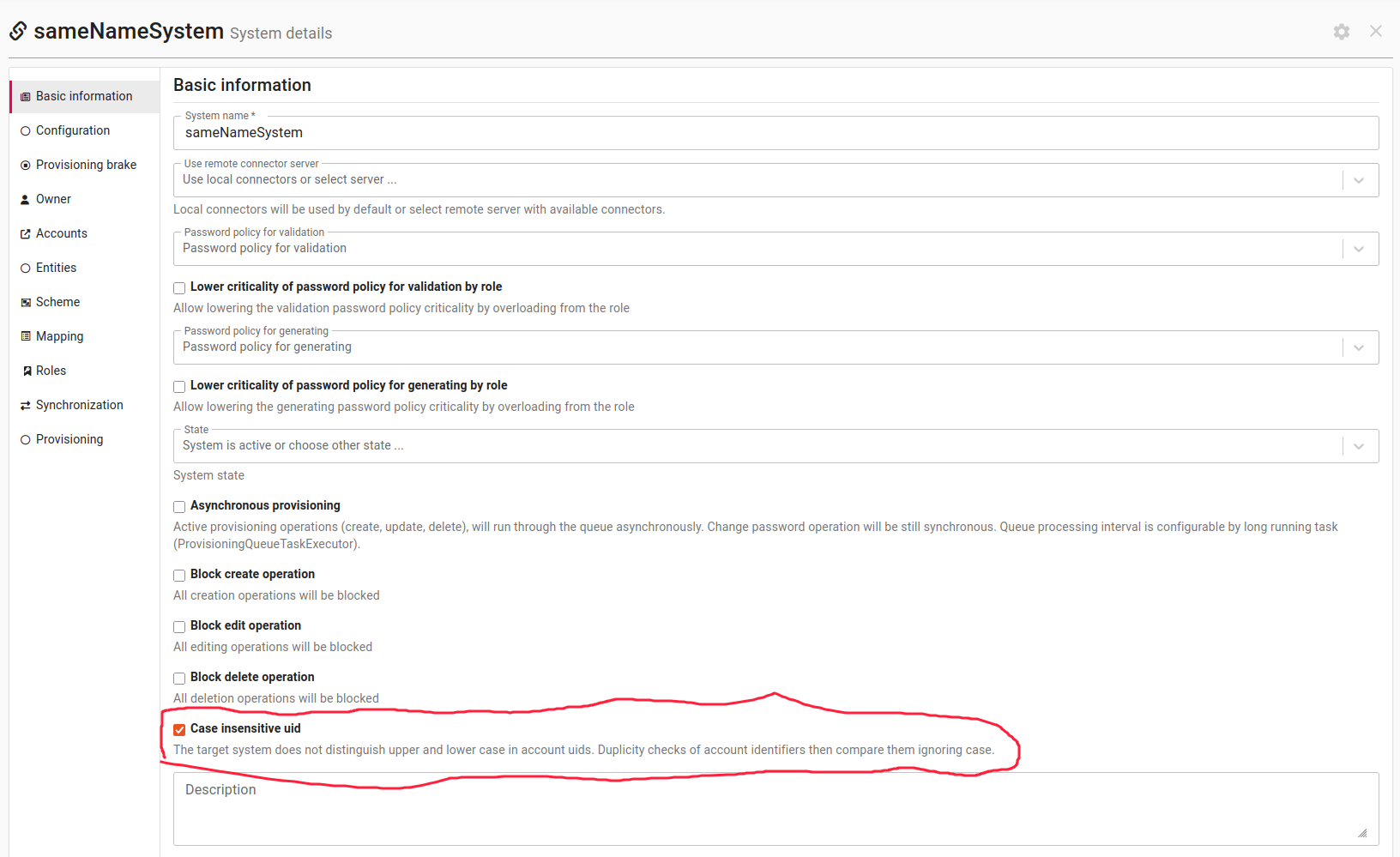
Asset assignment validation
Assigning a technical asset to a technical account is subject to a configurable validation - a Groovy script referenced from configuration which decides whether the given technical asset may be assigned to the given technical account. The delivered rule compares the zone of the asset with the zone of the linked AccAccount; out of the box nothing is enforced.
The check runs on every save of the involved entities - a change of the technical asset on the account, a change of the account, creation of the link, a change of the asset, provisioning - and it is also applied by the CSV import before it writes anything. When the pair is rejected, the operation fails with result code TECH_ACCOUNT_ASSET_ASSIGNMENT_REJECTED.
The script contract, the delivered scripts and the configuration property idm.sec.tech.accountAssetAssignment.checkScript are documented on the technical asset page.
TechnicalAccountAccount
Represents the link between a technical account and the real account on a target system (AccAccount). The link is what gives the technical account its system, its mapping, its provisioning and its roles - a technical account is expected to have exactly one of them. A technical account created through the REST API can exist without a link for a while, but it has no system until the link is created.
Key Attributes
| Attribute | Type | Description |
|---|---|---|
| id | UUID | primary identifier |
| technicalAccount | UUID | id of the technical account |
| account | UUID | id of the account on the target system (AccAccount) |
Permissions
| Permission | Description |
|---|---|
| ADMIN | all permissions |
| COUNT | permission to retrieve the count of entities |
| AUTOCOMPLETE | permission to display the entity in autocomplete suggestions |
| READ | permission to read the entity |
| CREATE | permission to create the entity |
| UPDATE | permission to edit entity attributes |
| DELETE | permission to delete the entity |
| CHANGEPERMISSION | permission to create a role request for the account behind the link |
Evaluators
| Evaluator | Target entity | Type | Description | Attributes |
|---|---|---|---|---|
| TechnicalAccountAccountByTechnicalAccountEvaluator | TechnicalAccountAccount | Transitive | Returns links where the logged user has access to the technical account. Permissions are transitively derived from the technical account. | Transfer permissions - a list of permissions to be transferred from a technical account to its links; if the list is empty, all permissions held by the user for the given technical account will be transferred |
| AccAccountByTechnicalAccountAccountEvaluator | AccAccount | Regular | Returns accounts on target systems where the logged user has access to the link between the technical account and the account. This is the evaluator which turns "I may manage this technical account" into "I may manage its account on the system". | No attributes |
TechnicalAccountGuarantee
Represents direct assignment of an identity as guarantor for a technical account.
Key Attributes
| Attribute | Type | Description |
|---|---|---|
| id | UUID | primary identifier |
| externalId | String | identifier assigned by an external system for integration purposes |
| technicalAccount | UUID | id of the technical account to be guaranted |
| guarantee | UUID | id of the user to be guarantor |
Permissions
| Permission | Description |
|---|---|
| ADMIN | all permissions |
| COUNT | permission to retrieve the count of entities |
| AUTOCOMPLETE | permission to display the entity in autocomplete suggestions |
| READ | permission to read the entity |
| CREATE | permission to create the entity |
| UPDATE | permission to edit entity attributes |
| DELETE | permission to delete the entity |
Evaluators
No module-specific evaluator is delivered for this entity. Access to it is granted by an authorization policy with a generic evaluator (typically "base permissions for all records") on the group permission TECHNICALACCOUNTGUARANTEE.
TechnicalAccountRoleGuarantee
Represents the assignment of a role to a technical account, where granting this role to a user designates them as a guarantor of that account.
Key Attributes
| Attribute | Type | Description |
|---|---|---|
| id | UUID | primary identifier |
| externalId | String | identifier assigned by an external system for integration purposes |
| technicalAccount | UUID | id of the technical account to be guaranted |
| role | UUID | id of the role which, when assigned to a user, makes them a guarantor |
Permissions
| Permission | Description |
|---|---|
| ADMIN | all permissions |
| COUNT | permission to retrieve the count of entities |
| AUTOCOMPLETE | permission to display the entity in autocomplete suggestions |
| READ | permission to read the entity |
| CREATE | permission to create the entity |
| UPDATE | permission to edit entity attributes |
| DELETE | permission to delete the entity |
Evaluators
No module-specific evaluator is delivered for this entity. Access to it is granted by an authorization policy with a generic evaluator on the group permission TECHNICALACCOUNTROLEGUARANTEE.
Technical account agenda
The overview of technical accounts can be accessed via the "Systems" and "Accounts" agendas in the main menu, on the "Technical accounts" tab. The technical accounts in this agenda can be filtered by the technical asset they belong to, as well as by the rest of their properties. The same table is used on the "Technical accounts" tab of a role (Role → Accounts with role) and in the "Technical accounts" sub-agenda of a technical asset; only the offered bulk actions differ.
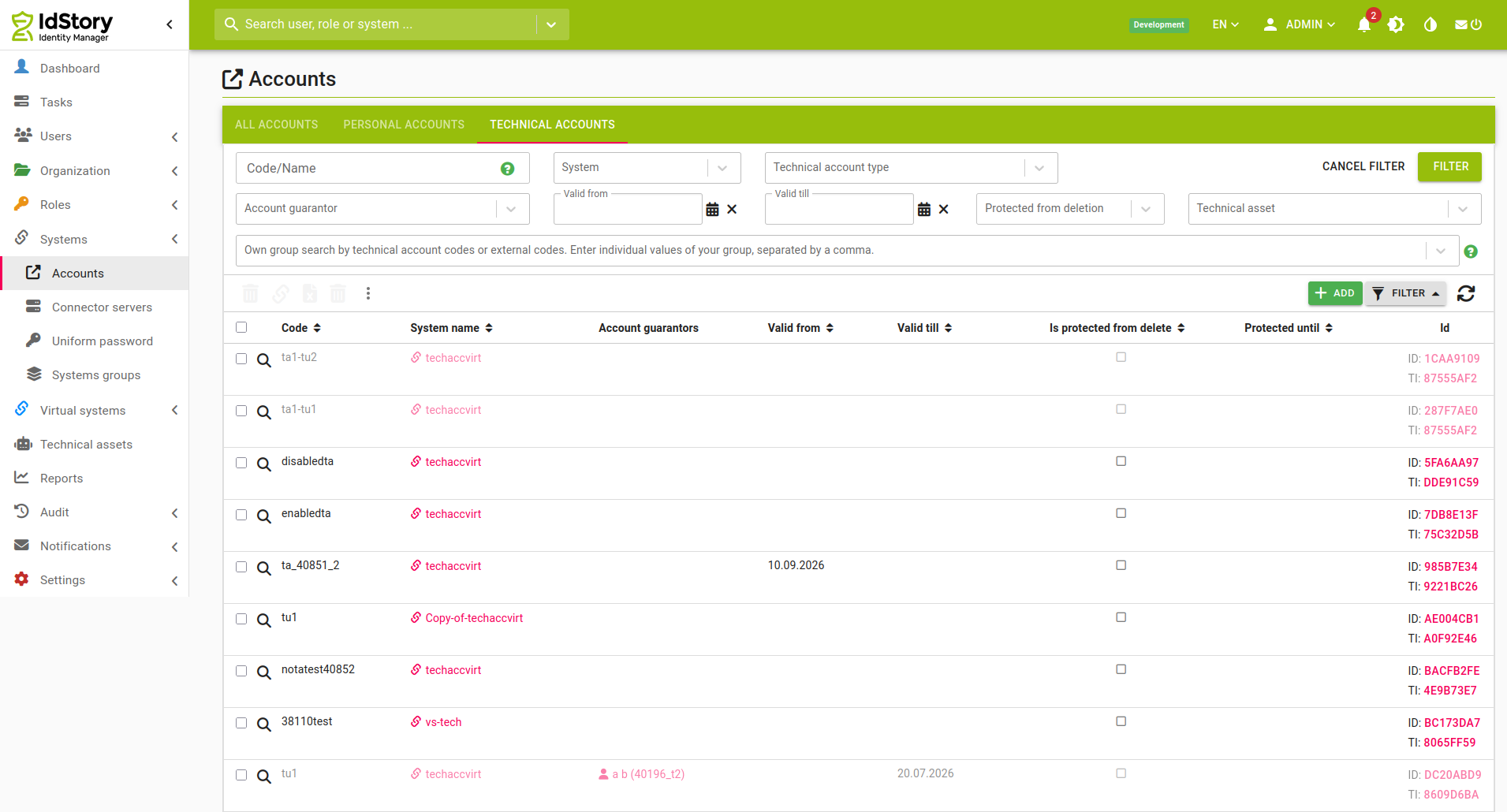
Table Columns
| Column | Description |
| Code | The code of the technical account - the Code/Name filter field uses case insensitive fulltext search. |
| System name | Name of the system to which the technical account provides access |
| Account guarantors | Guarantors of the technical account, including those listed directly and those who are guarantors via an assigned guarantor role |
| Valid from | Start date of the technical account's validity |
| Valid till | End date of the technical account's validity |
| Is protected from delete | Flag indicating that the account is protected from deletion (it is in quarantine) |
| Protected until | Date until which the account is protected from deletion (when the quarantine expires and the account will be deleted) |
Rows of disabled accounts and of accounts in quarantine are greyed out. The magnifying glass icon leads to the full account detail and is rendered only for users with TECHNICALACCOUNT_READ.
Filters
| Filter | Description |
| Account identifier | Enables searching by the identifier of the account; an exact match is required |
| System | Enables searching by the systems to which the technical account provides access; more systems can be selected |
| Technical account type | Enables searching by system mapping; more mappings can be selected |
| Account guarantor | Enables searching for technical accounts by guarantor (either direct or via a role); more identities can be selected |
| Valid from | Enables searching for technical accounts with a specific validity start date |
| Valid till | Enables searching for technical accounts with a specific validity end date |
| Protected from deletion | Enables searching only for accounts that are in quarantine, or only for those that are not |
| Technical asset | Enables searching for technical accounts belonging to the given technical asset |
Bulk Actions
| Bulk action | Description | Required permission |
| Report | Basic export of technical accounts | always available |
| Delete technical accounts | Deletes the selected technical accounts and their accounts on the target systems, including delete provisioning | Delete on the technical account |
| Stop managing technical accounts | Deletes the selected technical accounts but keeps the accounts on the target systems. No delete provisioning is performed - the accounts are simply no longer managed by the IdM | Delete on the account |
| Recalculate accounts and provision | Invokes account management for each selected account. Account management itself and the subsequent provisioning are performed asynchronously; the progress can be watched in the Events agenda | Read and Update on the account |
| Assign Role | Creates a role request assigning the selected role(s) to the selected technical accounts, optionally with a validity. Also available without a selection - the accounts are then picked in the action's form | Assign roles on the technical account |
| Remove Role | Creates a role request removing the selected role(s) from the selected technical accounts | Remove roles on the technical account |
Technical account creation
New technical accounts are created by the wizard for creating technical account. The "Add" button of the technical account agenda - rendered for users with the Account create permission - opens a dialog offering the account wizards registered in the application; the technical account wizard is one of them. The wizard has the following steps:
| Step | Description |
|---|---|
| Basic setting for account | Select the system, the type of user (the TECHNICAL_ACCOUNT system mapping used for the account), the account guarantors (by identity and/or by role) and the technical asset; see Technical account creation with/without technical asset |
| Basic attributes | Fill the attributes of the technical account itself - Code, Name, Inactive, Valid from, Valid to, Description |
| Attributes | Fill the attributes of the account on the target system. Values may be pre-filled from the mapping and, when the mapping allows it, changed manually. Roles - permissions can be requested here as well |
| Recapitulation | Check the filled values before the account is created |
| Finish | Confirmation that the account (or the request to create it) was created |
Creating a technical account can be subject to an approval workflow. The module registers the workflow event type Technical Account Creation Request (tech:tech-account-create-event-type), which is triggered when a user tries to create a new technical account; the approval task is named "Approval of technical account name creation on system system". An approver resolver delivering the task to the holders of the technical asset is available, as is a workflow condition Condition by technical asset, which lets the workflow branch by the asset the account belongs to. When the creation goes to approval, the wizard finishes with the "New request to create a technical account was submitted" message instead of creating the account right away.
Technical account Basic information
The detail of a technical account is opened from the technical account table by clicking the magnifying glass icon. The detail is the detail of the underlying account on the target system, with the technical part of the record on the Technical account tab, which is the tech module's own sub-agenda. If the user has the Update permission for the technical account, they can edit the fields.
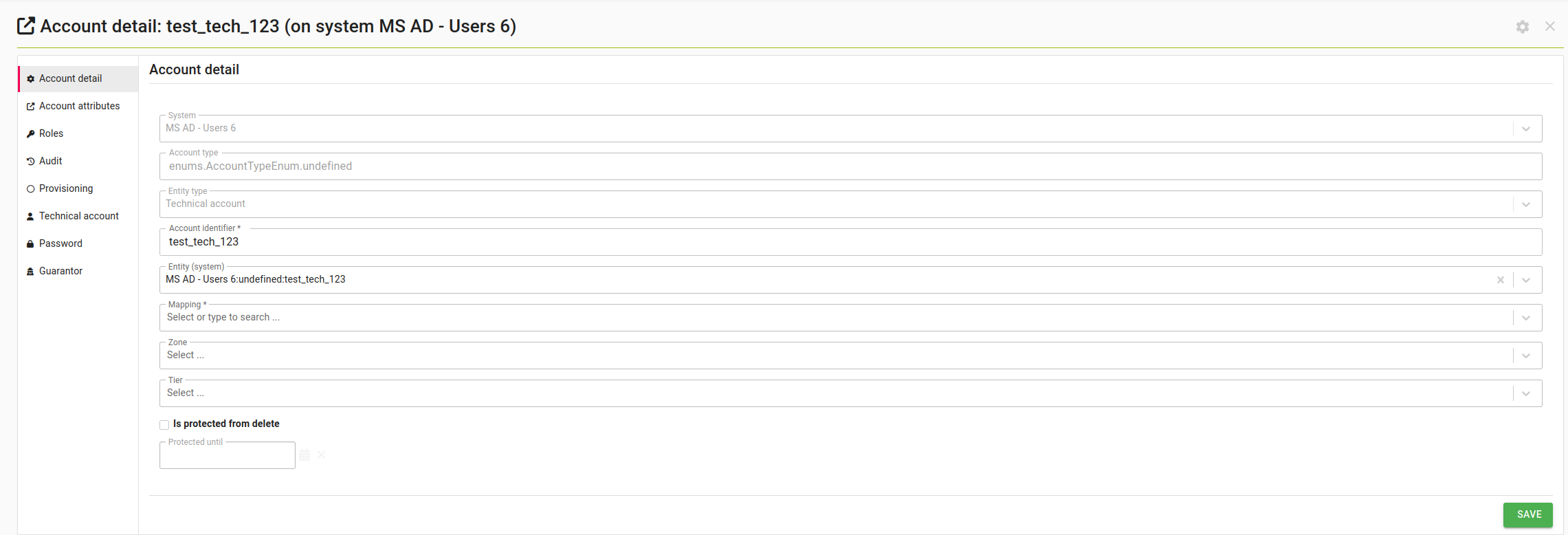
Fields
| Field | Description |
|---|---|
| Identificator | Identifier (code) of the account on the target system; unique per system |
| Name | Name (externalCode) of the account; unique across all systems, or empty |
| Account state | Lifecycle state of the account - always read-only, it is advanced by the scheduled tasks; see Account state and validity |
| Technical asset | Technical asset the account belongs to. Only assets for which the user has the Assign technical account permission are offered |
| Inactive | Flag indicating that the technical account is inactive |
| Valid from | Start date of the technical account's validity |
| Valid till | End date of the technical account's validity |
| Description | Description of the technical account |
Technical account System account
The remaining tabs of the detail are provided by the acc module and describe the account on the target system itself:
| Tab | Description | Required permissions |
|---|---|---|
| Account detail | Basic attributes of the account on the target system - system, identifier, entity type, mapping, protection from deletion | Account read |
| Account attributes | Attributes of the object as they are read from the connector | Account read, System read |
| Roles | Roles assigned to the account, i.e. the permissions the technical account holds on the target system; see Technical account Roles | Account read |
| Provisioning | Provisioning operations and the provisioning archive of the account | Account read, Provisioning operation read |
| Audit | Audit log of the account and its related entities; see Technical account Audit | Account read, Audit read |
Technical account Roles
The permissions a technical account holds on its target system are roles assigned to the account, not to a person - there is no role assignment table of its own in the tech module. Assigning a role to a technical account creates a standard role request whose applicant is the technical account; when the request is realized, the role assignment is created on the linked account on the target system.
| Operation | Required permission |
|---|---|
| See the assigned roles | Read on the account |
| Create a role request for the account | Change roles on the technical account |
| Assign a role (bulk action) | Assign roles on the technical account |
| Remove an assigned role (bulk action) | Remove roles on the technical account |
Technical account Guarantors
This sub-agenda allows you to manage the direct guarantors of the technical account, as well as guarantor roles, the assignment of which makes a user a guarantor. Both lists offer an "Add" button for users who may create the relation, and a Delete action for users who may delete it.
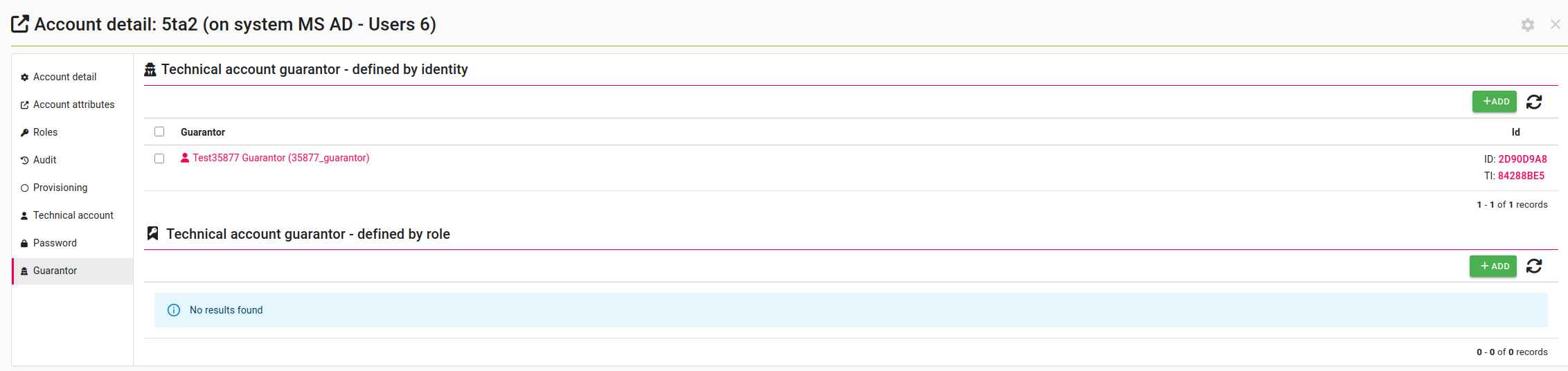
Table Columns
| Column | Description |
| Guarantor | Identity which is a direct guarantor of the technical account (first table) |
| Role | Role whose holders are guarantors of the technical account (second table) |
Both tables offer a row-level Delete action, which removes the selected guarantor or guarantor role from the technical account. No other bulk actions are registered for these entities.
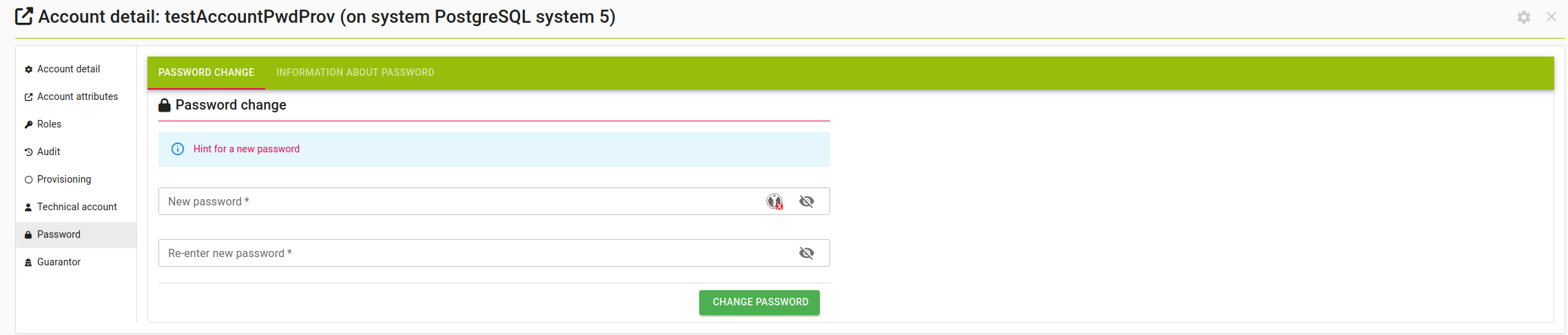
Technical account Password
This sub-agenda manages the password of the technical account on the target system.
| Sub-agenda | Description | Required permission |
|---|---|---|
| Password change | Sets a new password for the account and provisions it to the target system. Password policies of the system are pre-validated before the change | TECHNICALACCOUNT_ADMIN |
| Information about password | Metadata of the password - when it was changed, when it expires, and the rest of the standard password detail | PASSWORD_READ |
Technical account Audit
The Audit tab of the detail displays the audit log of the account on the target system and its related entities. All tech_* tables are audited as well, so every change of the technical account, of its guarantors and of its link to the account is recorded; the revisions of the technical account itself are also available in the Audit agenda in the main menu and through the /tech/technical-account/{id}/revisions REST endpoint.
Table columns
| Column | Description |
|---|---|
| Entity type | Type of entity upon which the action was performed |
| Entity (IdM) | Entity upon which the action was performed |
| Sub owner code | Code of the secondary related entity - for a technical account this is the code of its technical asset |
| Action | Type of performed action |
| Executed by | Username of the user who performed the action |
| Date of revision | Date and time when the action was performed |
| Changed attributes | List of attributes changed during the action |
Filters
| Filter | Description |
|---|---|
| Date | Enables searching for actions performed within a specific period |
| Entity type | Enables searching by the type of entity upon which the action was performed |
| Executed by | Enables searching by the username of the user who performed the action; an exact match is required |
| Own group search by changed attributes | Enables searching for actions during which the given list of attributes was changed |
Technical account guarantor and system owner roles
To simplify permission setup, the techAccountGuarantorRole and techAccountSystemOwnerRole roles have been created, which grant permissions to guarantors of technical accounts and to owners of the systems the accounts live on. These roles can either be nested under userRole or assigned directly to selected users. Both of them are created on startup with the SYSTEM role type and are registered in the default role catalogue; the role codes can be changed with the configuration properties idm.sec.tech.role.guarantor and idm.sec.tech.role.systemowner, and setting a property to an empty string suppresses the creation of the role altogether.
The two roles differ only in which technical accounts they cover - the guarantor role covers the accounts where the user is a guarantor (directly or via a guarantor role), the system owner role covers all technical accounts on the systems the user owns (directly or via a system owner role). Default permission settings:
| Feature | In guarantor role | In system owner role |
| Read and manage my technical accounts (all permissions) | Yes | Yes |
| Read and manage the link between my technical accounts and their accounts on the target systems | Yes | Yes |
| Read and manage the accounts on the target systems belonging to my technical accounts | Yes | Yes |
Permissions on technical accounts are granted by two more product-provided roles, techAssetGuarantorRole and techAssetHolderRole, which cover the technical accounts under a technical asset the user guarantees or holds. Those are described on the technical asset page.