

Table in GUI - create a new
Last modified by tomiskar on 2018/02/28 12:29
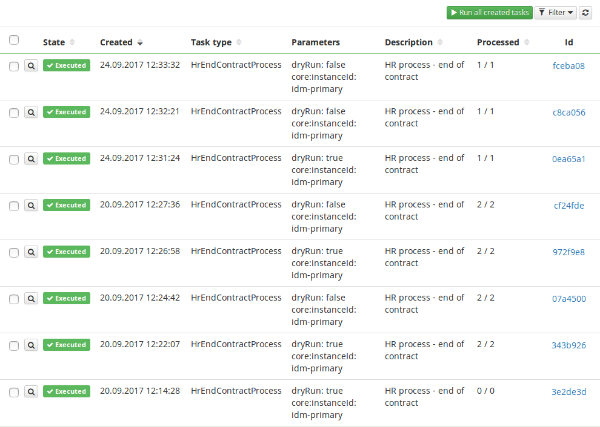
Table:
We will use one of components in Advanced folder. It is Table component. We can find this component in Basic too, but it's better to use Advanced for its "advanced" features such as sorting of columns. It is used like this:
<Advanced.Table
ref="table"
showRowSelection={showRowSelection} // If you are able to select row or not
uiKey={uiKey} // Special key refering to this table
manager={manager} // This is really important. Each table needs its manager because then it will show data you really need to see there
forceSearchParameters={forceSearchParameters} // These parameters filter table by default. It is preset filter which is not adjustable by user
rowClass={({rowIndex, data}) => { return Utils.Ui.getRowClass(data[rowIndex]); }} // TODO
filter={this.getAdvancedFilter()} // There are user adjustable filters - filters are shown bellow
filterOpened={filterOpened} // If filter form is shown or not
_searchParameters={searchParameters} // TODO
actions={actionToAdjustItems} // Actions are connected to showRowSelection. It's a selection table with operation for selected rows
buttons={somebuttons}> // Buttons to be in table
ref="table"
showRowSelection={showRowSelection} // If you are able to select row or not
uiKey={uiKey} // Special key refering to this table
manager={manager} // This is really important. Each table needs its manager because then it will show data you really need to see there
forceSearchParameters={forceSearchParameters} // These parameters filter table by default. It is preset filter which is not adjustable by user
rowClass={({rowIndex, data}) => { return Utils.Ui.getRowClass(data[rowIndex]); }} // TODO
filter={this.getAdvancedFilter()} // There are user adjustable filters - filters are shown bellow
filterOpened={filterOpened} // If filter form is shown or not
_searchParameters={searchParameters} // TODO
actions={actionToAdjustItems} // Actions are connected to showRowSelection. It's a selection table with operation for selected rows
buttons={somebuttons}> // Buttons to be in table
If we want implement manager and service we can use this tutorial.
Column:
Now we need to add some columns into our table
<Advanced.Column
property="operationResult.state" //which property will be shown in this column. Refers to database column name
header="State" // Text to be shown in the top of column
width={75} // Width of column
sort // Boolean if user is able to sort table by this parameter
face="enum" // How this property will look like in the table.
enumClass={OperationStateEnum} // TODO
/>
property="operationResult.state" //which property will be shown in this column. Refers to database column name
header="State" // Text to be shown in the top of column
width={75} // Width of column
sort // Boolean if user is able to sort table by this parameter
face="enum" // How this property will look like in the table.
enumClass={OperationStateEnum} // TODO
/>
In same folder we can find column component. You can see its usage README.dm.
Filter
For filter we just use Form:
<Advanced.Filter onSubmit={this.useFilter.bind(this)}>
<Basic.AbstractForm ref="filterForm">
<Basic.Row>
<Basic.Col lg={ 4 }>
<Advanced.Filter.DateTimePicker
mode="date"
ref="from"
placeholder={this.i18n('entity.LongRunningTaskItem.filter.from.placeholder')}/>
</Basic.Col>
<Basic.Col lg={ 4 }>
<Advanced.Filter.DateTimePicker
mode="date"
ref="till"
placeholder={this.i18n('entity.LongRunningTaskItem.filter.till.placeholder')}/>
</Basic.Col>
<Basic.Col lg={ 4 } className="text-right">
<Advanced.Filter.FilterButtons cancelFilter={this.cancelFilter.bind(this)}/>
</Basic.Col>
</Basic.Row>
<Basic.Row className="last">
<Basic.Col lg={ 4 }>
<Advanced.Filter.EnumSelectBox
ref="operationState"
placeholder={this.i18n('entity.LongRunningTaskItem.filter.state.placeholder')}
enum={OperationStateEnum}/>
</Basic.Col>
<Basic.Col lg={ 4 }>
<Advanced.Filter.TextField
ref="text"
placeholder={this.i18n('entity.LongRunningTaskItem.filter.text.placeholder')}/>
</Basic.Col>
</Basic.Row>
</Basic.AbstractForm>
</Advanced.Filter>
<Basic.AbstractForm ref="filterForm">
<Basic.Row>
<Basic.Col lg={ 4 }>
<Advanced.Filter.DateTimePicker
mode="date"
ref="from"
placeholder={this.i18n('entity.LongRunningTaskItem.filter.from.placeholder')}/>
</Basic.Col>
<Basic.Col lg={ 4 }>
<Advanced.Filter.DateTimePicker
mode="date"
ref="till"
placeholder={this.i18n('entity.LongRunningTaskItem.filter.till.placeholder')}/>
</Basic.Col>
<Basic.Col lg={ 4 } className="text-right">
<Advanced.Filter.FilterButtons cancelFilter={this.cancelFilter.bind(this)}/>
</Basic.Col>
</Basic.Row>
<Basic.Row className="last">
<Basic.Col lg={ 4 }>
<Advanced.Filter.EnumSelectBox
ref="operationState"
placeholder={this.i18n('entity.LongRunningTaskItem.filter.state.placeholder')}
enum={OperationStateEnum}/>
</Basic.Col>
<Basic.Col lg={ 4 }>
<Advanced.Filter.TextField
ref="text"
placeholder={this.i18n('entity.LongRunningTaskItem.filter.text.placeholder')}/>
</Basic.Col>
</Basic.Row>
</Basic.AbstractForm>
</Advanced.Filter>