

Roles - Import of data from CSV (v16)
The long running task (LRT) Import roles from CSV imports roles from a CSV file - one record of the file is one role. The role is created when it does not exist yet, otherwise it is updated. Every value is read from the column configured in the parameters of the task, so the file can contain any subset of the supported columns - a value of a column which is not mapped is never touched.
1. Prepare the CSV file
Here is an example of a CSV file which can be used for importing (or updating) roles, setting their role attributes, guarantees (by user, or by role) and criticality, for saving them in a created catalogue and for assigning their subordinate role. To use this CSV file, create a new identity with user name user-login, and a new role with code role_code to set guarantees. Have a virtual system called 'test'.
testimportrolename;testimportrolecode;desc;attr1;user-login;;role_code;;4;yes;no;cat1|cat3;;eav;value;test;rights;testimportrolename
In Excel, it looks like this:

More values at once can be set in the columns with the catalogues, the subroles, the guarantees, the guarantees by role, the incompatible roles and the role attributes - the values are separated by the multi value separator from the parameters of the task, | by default. Every other column holds a single value, the column with the role names included. The file can contain any number of columns, which column is used for what is set in the parameters of the task.
The result of this LRT used with this CSV file should be that one new role testimportrolename (with code testimportrolecode) will be created. It will have these properties:
- description: 'desc'
- attribute: 'attr1'
- guarantee: user with username 'user-login'
- guarantee by role: role with the code 'role_code'
- criticality: 4
- it can be requested and it is not disabled
- catalogue: it will be in 'cat1' and 'cat3'
- it will have EAV with code 'eav' with value 'value'
- it will create an account on system 'test' and set value of attribute 'rights' to 'testimportrolename'
2. Create a new long running task
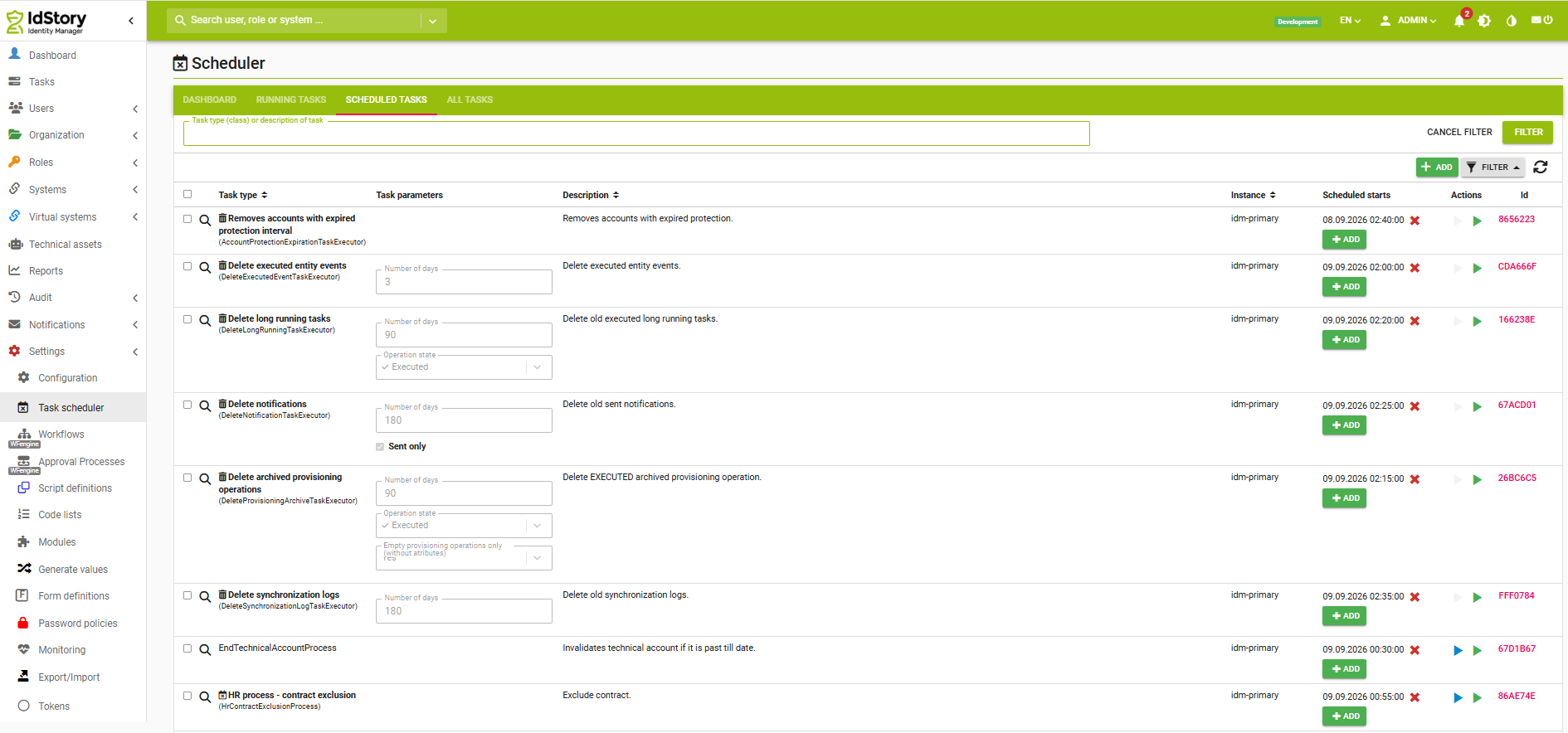
Now we will create the new long running task. As shown in the picture, go to Settings -> Task scheduler -> Scheduled tasks and hit the green Add button to add a new LRT. Select the task Import roles from CSV (ImportRolesFromCSVExecutor).
3. Fill in the parameters
Parameters of the task are grouped into sections, each section is rendered as a frame with its name in the form of the task. @since 16.1.0
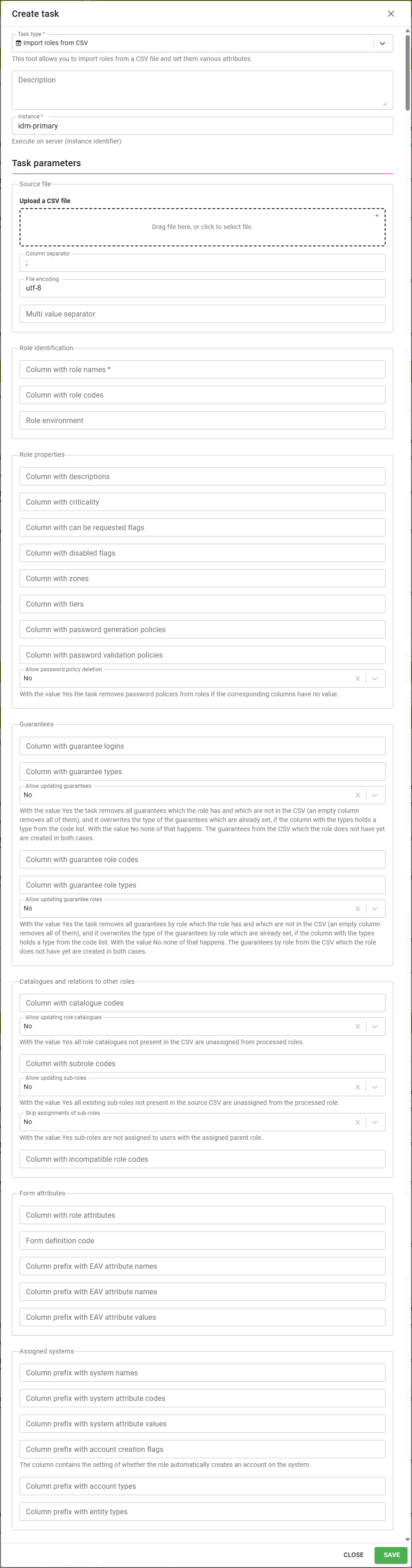
Source file
- Upload a CSV file - dropzone to select or drop the csv file
- File encoding - encoding of the input file, utf-8 by default
- Column separator - separator of the columns in the csv file, ; by default
- Multi value separator - separator of the values in the columns which can hold more values at once, | by default. Up to version 16.0.1 the parameter had no effect and the pipe was always used, it works since 16.1.0.
Role identification
The record is paired with the role by the code of the role. The code is taken from the column with the role codes, or it is derived from the name of the role (spaces are replaced by underscores) when the column is not mapped or is empty for the record. The role is looked up by that code, then by the code derived from the role name and finally, when the environment is filled in, by the base code and the environment.
- Column with role names - name of the column with roles in the csv file, this parameter is mandatory
- Column with role codes - name of the column with role codes in the csv file; if left empty, the role code is based on the role name, only spaces are replaced by underscores
- Role environment - the name of the environment to which you want to add the role; the environment is set to the created roles only, it is never changed on the existing ones. Roles of the environment are paired correctly, because the environment is a part of the full code of the role.
Role properties
- Column with descriptions - name of the column with role description, can be also used to update description; an empty value never overwrites the current description
- Column with criticality - name of the column with role criticality, can be also used to update criticality; if no criticality is specified, the default is 0 for the created role and the criticality of the existing role is not changed
- Column with can be requested flags - name of the column with the flag whether the role can be requested. Values true/false, yes/no and 1/0 are accepted (case insensitive). When the column is not mapped, the created role cannot be requested and the existing role is not changed. @since 16.1.0
- Column with disabled flags - name of the column with the flag whether the role is disabled, the accepted values and the behaviour are the same as with the can be requested flag. @since 16.1.0
- Column with zones - name of the column with the zone of the role
- Column with tiers - name of the column with the tier of the role
- Column with password generation policies - name of the column with the code of the password policy of the type GENERATE
- Column with password validation policies - name of the column with the code of the password policy of the type VALIDATE
- Allow password policy deletion - with the value Yes the task removes the password policy from the role when the column of the policy is empty. With the value No an empty column never changes the current policy of the role.
Guarantees
- Column with guarantee logins - name of the column with role guarantee by identity login, can be also used to update guarantee
- Column with guarantee types - name of the column with role guarantee by identity type; the column holds one type which is used for all the guarantees of the record and it has to be an item of the guarantee-type code list, otherwise it is ignored (since Extras 2.2.0)
- Allow updating guarantees - with the value Yes all guarantees of the role which are not in the CSV are removed (an empty column removes all of them) and the type of the guarantees which are already set is overwritten by the value from the CSV. With the value No none of that happens. The guarantees from the CSV which the role does not have yet are added in both cases, the parameter does not control that. (since Extras 2.2.0)
- Column with guarantee role codes - name of the column with role guarantee by role code, can be also used to update role guarantee
- Column with guarantee role types - name of the column with role guarantee by role type; the column holds one type which is used for all the guarantees by role of the record (since Extras 2.2.0)
- Allow updating guarantee roles - the same behaviour as Allow updating guarantees, but for the guarantees by role (since Extras 2.2.0). Up to version 16.0.1 the parameter had no effect and the guarantees by role were driven by Allow updating guarantees, it works since 16.1.0.
Catalogues and relations to other roles
- Column with catalogue codes - name of the column with catalogue names, can be also used to update catalogue names. A catalogue which does not exist is created.
- Allow updating role catalogues - with the value Yes the role is removed from all catalogues which are not in the CSV. With the value No the role is only added into the catalogues.
- Column with subrole codes - name of the column with subordinate role codes, can be also used to update subordinate roles
- Allow updating sub-roles - If set to No, the subroles column will be ignored if the imported role already exists in IdM. Please note that if this field is set to Yes, all the direct subroles of the imported roles not listed in the import csv will be unassigned. If the subroles column is not present at all, it will be treated as if it was empty, i.e. all direct subroles of all roles in the import csv will be unassigned. Subroles deeper in the hierarchy (subroles of subroles and so on) are preserved as long as they themselves are not in the hierarchy.
- For example if I have roles A, B and C where B is a subrole of A and C is a subrole of B, and I import role A with no subroles, the relation between A and B is removed while the one between B and C is preserved.
- Skip assignments of sub-roles - with the value Yes sub-roles are not assigned to users with the assigned parent role (useful for sub-role assignment under roles which are not assigned to a user, available from version 14.6.0)
- Column with incompatible role codes - name of the column with codes of the incompatible roles. Incompatible roles are only added, they are never removed by the import.
Form attributes
- Column with role attributes - name of the column with role attributes, can be also used to update attributes
- Form definition code - the code for the definition which will contain the added attributes (you only have to fill this if you are setting attributes)
You can also set the value of multiple role EAVs. The mechanism used for this is prefixes which are followed by the order number of the column (e. g., 'eavcode1', where 'eavcode' is the prefix and '1' the order number). The combination of the prefix and the number identifies a column uniquely.
- Column prefix with EAV attribute names - only attributes from the main role definition can be imported and they must be of type SHORTTEXT. Supports update (the current value of the attribute will be overwritten if imported). An attribute which is not in the main definition of the role is reported as a not executed item and the record is processed.
- Column prefix with EAV attribute values
Assigned systems
You can set attributes at multiple systems or set multiple attributes in one system. The mechanism used for this is prefixes which are followed by the order number of the column (e. g., 'systemname1', where 'systemname' is the prefix and '1' the order number). The combination of the prefix and the number identifies a column uniquely.
- Column prefix with system names - the system has to exist, otherwise the whole import ends with an error
- Column prefix with system attribute codes
- Column prefix with system attribute values - the attribute has to be a multivalued attribute with the merge strategy set. It should not contain ":" (colon), see the known issues below. When the value is empty, the name of the role is used.
Since module version 14.1.0 15.1.0 you can configure columns for parameters that specify the selection of mapping for linking a role to a system. All of these parameters are optional:
- Column prefix with account creation flags - if not set, the default value is true. In the import file, you can use values true/false, yes/no, or 1/0 (case-insensitive).
- Column prefix with entity types - if not set, IDENTITY is used by default. Possible values are IDENTITY and TECHNICAL_ACCOUNT.
- Column prefix with account types - if not set, this field remains empty. Possible values are PERSONAL, PERSONAL_OTHER (both are compatible with the IDENTITY entity type), and TECHNICAL (compatible with the TECHNICAL_ACCOUNT entity type).
The entity type and account type act as filters for available mappings. The system selects the first mapping returned by the filter (if multiple mappings match, one is selected essentially at random). The flag for account creation then defines the specific behavior for that link; in previous versions, the default behavior was always used, where the role automatically creates an account on the system.
For example, consider the following import file:
My role;my-role;Some system;Yes;PERSONAL;IDENTITY;Other system;false;PERSONAL_OTHER;IDENTITY
Set the following:
- Column prefix with system names: system
- Column prefix with account creation flags: roleCreatesAccount
- Column prefix with account types: accountType
- Column prefix with entity types: entityType
Then, the import
- will create a role with the name 'My role' and the code 'my-role'
- will connect the role with system Some system via provisioning mapping of personal accounts and role assignment will create account on system
- will connect the role with system Other system via provisioning mapping of other personal accounts and role assignment will not create account on system
4. Run the task
The import is an ordinary long running task, so it is run from Settings -> Task scheduler. Running it and scheduling it need the SCHEDULER_EXECUTE permission.
Start the import
Find the created task in the Scheduled tasks tab and use the green Run manually button in its row. The blue button next to it starts the task as a dry run and it is disabled here - the import does not support the dry run mode, so there is no way to let it only report what it would do without changing anything.
The uploaded file stays attached to the task, so the task can be run repeatedly and every run imports the same file until a new one is uploaded in the parameters of the task. That is also the reason why the import can be scheduled by a trigger in the detail of the task - it makes sense when the file on the same place is regularly replaced by another system.
Check the result
The run is executed on the background. Its progress and its result are in the All tasks tab, the newest run of the task is on the top of the list. Two tabs of the detail of the run matter for the import:
- Basic information - the parameters the run was started with, how many records of the file are already processed (Processed out of Count) and the number of the successful items, of the items with a warning and of the failed ones
- Processed items - one row per record of the file with the role the record belongs to and with the state of its processing. The message of the item says what exactly happened, so this is the place where the result of the import is checked.
The state of the items sums up the import:
- success - the role was created or updated by the record
- warning - the record was processed, but a part of it was skipped, typically because something the record refers to does not exist - an identity, a role, a password policy, a guarantee type or an EAV attribute. The message names the skipped value. A record which changes nothing on an already existing role is reported here as well.
- failed - the record was not processed at all, see the errors of the import below. When such a record fails before the role is created, the item has no reference to an existing role and only its message identifies the record.
A long import can be stopped in the Running tasks tab - End task lets the current record be finished, Interrupt task ends the run immediately. The records processed so far stay in IdM in both cases, the same as when the whole import ends with an error.
The Run task again button in the row of the finished run is disabled for this task. To repeat the import, run it again from the Scheduled tasks tab - the records which were already imported only update the existing roles, so a run repeated after a fix of the file is safe.
The imported roles are then in the Roles agenda with everything the file set on them.
What is updated and what is removed
The task adds values by default, it removes them only when the update of the given kind is explicitly allowed.
| Value | New role | Existing role |
|---|---|---|
| Name | set from the CSV | renamed by the value from the CSV |
| Description | set from the CSV | updated, an empty value is ignored |
| Criticality | set from the CSV, 0 when the value is empty | updated, an empty value is ignored |
| Can be requested, disabled | value from the CSV, false when the column is not mapped | updated only when the column is mapped |
| Zone, tier | set from the CSV | set from the CSV, an empty value clears the current one |
| Password policies | set from the CSV | updated, removed when the column is empty and the deletion is allowed |
| Guarantees, guarantees by role | added | added, the ones which are not in the CSV are removed when their update is allowed |
| Catalogues | added | added, the ones which are not in the CSV are removed when the update of the catalogues is allowed |
| Sub roles | added | added, the ones which are not in the CSV are removed when the update of the subroles is allowed |
| Incompatible roles | added | added, never removed |
| Role attributes | added | added, never removed |
| EAVs | set from the CSV | overwritten by the value from the CSV |
| Systems | assigned | assigned, the mapped attribute is overwritten |
| Environment | set from the parameter of the task | never changed |
Errors of the import
The task distinguishes errors of one record from errors of the whole import:
- the whole import ends with one error and no record is processed when a column mapped in the parameters is missing in the header of the CSV file @since 16.1.0
- the whole import ends with an error and the records processed so far are kept when a system from the file does not exist, when the criticality is not a number or when two role attributes in the file give the same generated code
- one record is reported as a failed item and the rest of the file is processed when a mapped column with the can be requested or the disabled flag does not contain a boolean value @since 16.1.0
- one record is reported as a not executed item and is processed when a referenced identity, role, password policy, guarantee type or EAV attribute does not exist
Known issues
- Colon in the value of a system attribute - the value of the mapped attribute must not contain the ":" (colon) character, the whole string after the colon is ignored.
- Two attributes with the same generated code - the code of the role attribute is derived from its name (spaces are replaced by underscores), so names like 'attr x' and 'attr_x' give the same code attr_x and the import ends with an error. Rename one of the attributes in the file.
- A file with the header only - when the file contains no record, the import ends successfully and the mapped columns are not checked at all.
- Files left in the dropzone - if you delete or upload a new file via the dropzone, you should delete the old files, created from the previous uploads.
- A partially imported record - the role is saved before its systems are processed, so a role of a record which ends with an error can already exist in IdM.