

Modules - pwd-reset: How to reset forgotten password?
This module provides the functionality of password reset or, in other words, the recovery of a forgotten password.
How to allow password reset in CAS?
For CAS docker set env variables:
- CAS_CUSTOM_FRONTEND_PASSWORDRESET_LINK=<idm url>/\#/password-reset # IMPORTANT: don't forget to escape characters like #
How does it work?
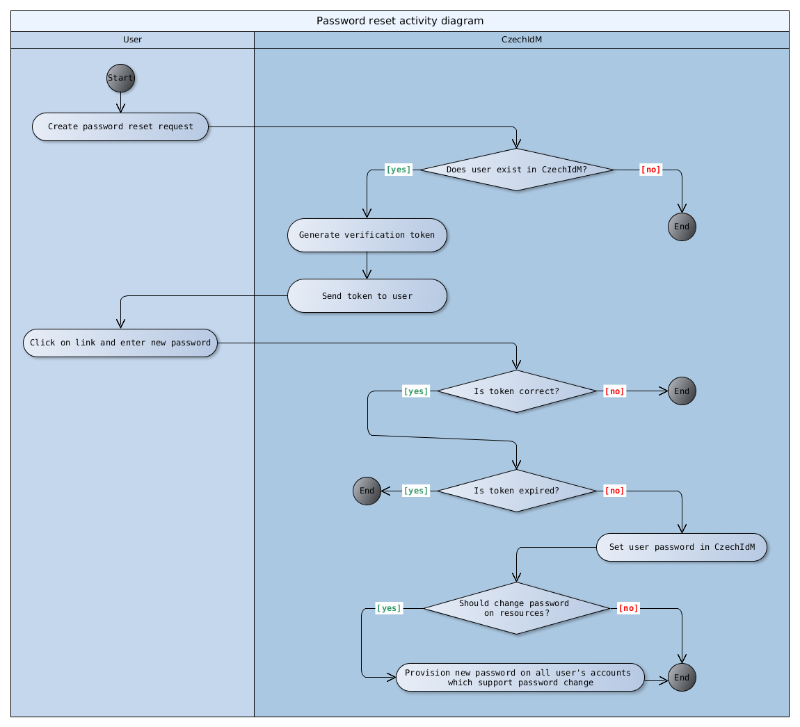
Process of restoring your forgotten password
Users can restore their forgotten password via the password reset module. User can start the process on CzechIdM´s login page by clicking on "Forgotten password" link. In next step user it is required to enter an account identifier.
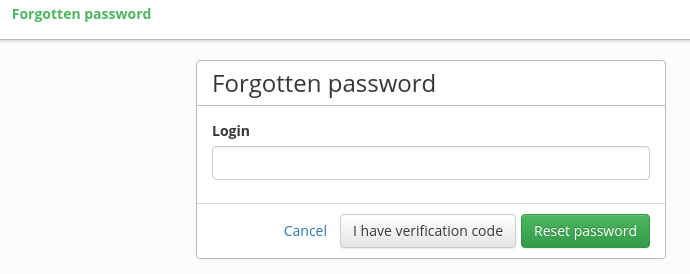
For now, the identity's email or login are supported and admin can use a configuration property to select which of these (or both) can be used. User then confirms password reset request by clicking on submit button. CzechIdM then generates validation token and stores it in the password reset request along with the time of creation. Validation token is then being sent to user via notification. Administrator can edit the notification using standard CzechIdM notification functionality. Notification is sent to topic "passwordResetRequestCreated" with SUCCESS level.
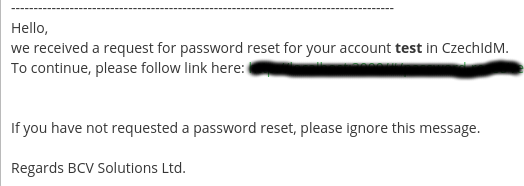
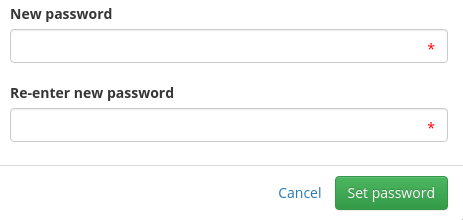
After clicking on the link, which contains verification token in GET parameters, user is asked to fill in new password. If the password change succeeds (password validation is OK and user can change their own password), then the user can log in to CzechIdM with a new password.
Password generating
Password reset module has a process for generating new password by default based on a password policy for IdM. The form for password generating is a part of the password change component. To generate password to an end system it is necessary to enable the event type PASSWORD_GENERATE for processor in acc (processor.identity-password-provisioning-processor).
Password generating is available by permission IDENTITY PASSWORDRESET (and also APP_ADMIN).
Password Policy Handling with password criticality
System Policy Defaults: Each system has a default password policy for generating passwords. Role-Based Policy Override: If the system allows lowering password criticality by role, new access rules apply: Different Criticalities:
- If two systems are selected, with one having Admin criticality and the other Technical account, the stronger policy (Admin) is used.
- emSame Policies, Different Sources: If two systems have identical policies but one was created later, the password follows the older policy.
IdM Accounts:
- When generating passwords for IdM accounts, role criticalities on contracts are considered.
Combining Systems and IdM: If both systems and IdM are selected, the higher criticality policy prevails; if policies are the same, the older policy is used.
Reset password in user´s system accounts
Password reset module changes user's passwords only to their CzechIdM account. To reset passwords to end system accounts you need to have the acc module enabled and do a little bit of configuration. You need to set IdentityPasswordProvisioningProcessor and PasswordValidateProcessor to respond to PASSWORD_RESET event type. You can do it by setting
idm.sec.acc.processor.identity-password-validate-processor.eventTypes=PASSWORD,PASSWORD_RESET
After the password reset, notification is sent to user with system names and accounts, where password has been changed. This processor has to be enabled with setting
Now IdM will also reset password on all user accounts which support it.
Installation
Download the module distribution package. The package contains a backend folder. Your IdM Tomcat installation we call IDM in the following example.
- Copy the content of the backend folder into your tomcat IdM installation - [IDM]/WEB-INF/lib
- Set correct access rights to the files if needed (chown tomcat:tomcat [IDM]/WEB-INF/lib/*)
- Restart the IdM application server (service tomcat restart)
- Log in to CzechIdM as a privileged user and go to Settings → Modules and enable the pwd-reset module.
- Go to the configuration and configure required properties (see below).
- Add the event types PASSWORD\_RESET and PASSWORD\_GENERATE for processors as described above, if you want to reset and provision generated passwords for end system accounts (typically, you do).
Configuration
The module provides following configuration properties:
| Property | Description | |
|---|---|---|
| idm.pub.pwdreset.allowed.attrs | REQUIRED. List of identity attributes (separated by comma) which can be used by user to identify their account when reseting password (username, email and personal number are available for now) | |
| idm.sec.pwdreset.token.ttl | How many minutes is verification token valid (default is 60 minutes) | |
| idm.pub.pwdreset.identity.passwordReset.public.idm.enabled | Boolean value to enable/disable password reset and password generate for CzechIdM system. Default value is true (password reset and password generate is enabled). | |
| idm.sec.pwdreset.debug | Debug password reset, if value is true token will be visible in notification in IdM. | |
| idm.sec.pwdreset.token.length | Length of generated verification tokens - Default is 25 | |
| idm.sec.acc.pwd.resetEventTypes | @since 15.18.0. Acc property (comma separated) listing password event types that require the account "Password reset and generate" permission instead of "Password change" for per-account authorization (see acc-account-by-system-evaluator). The pwd-reset module registers its own event types (PASSWORD_RESET, PASSWORD_GENERATE) into it automatically on first start; other modules can extend it. Acc ships no default. |
Video Guide
How to reset password - czech language