

Module of reports: SQL Universal report (installation guide)
- Module of reports: SQL Universal report
- Example SQL queries
- Most frequently used tables
- Finding an object by UUID
- Queries over synchronization
- Queries over identities and accounts
- Queries over assigned roles and attributes
- Queries over automatic roles
- Queries over roles and systems
- Queries over virtual systems
- Queries over events
- Queries over organizations
- Queries over contracts
- Queries regarding transformation scripts
- Queries/reports over audits
- TOKEN queries for identities
- Queries over the scheduler
- Queries over activity (workflow) tables
Module of reports: SQL Universal report
This report will report an entire database table/view or data based on a custom SQL query.
Only a user with superadmin permission can execute this report
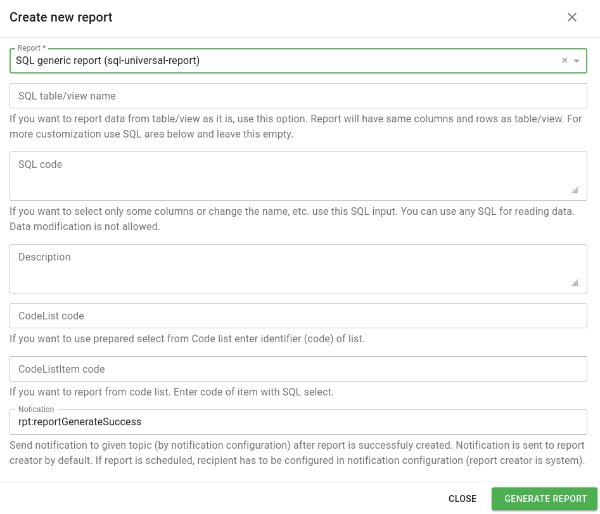
You have three options for running this report:
- Table/view name - reports all data from a table/view as it is in the database
- SQL query - reports data based on a custom SQL query
- Code list - reports data based on a custom SQL query prepared and stored in code list
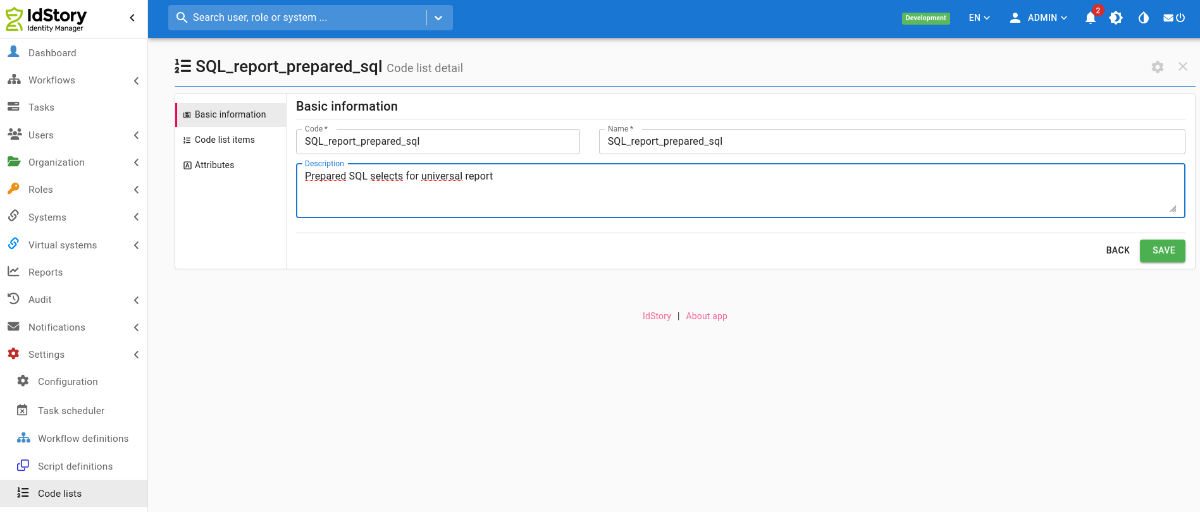
Configuration for code list
You need to create new code list with any code eg.: SQL_report_prepared_sql. Code of code list with queries is set in configuration property <font 10ptwhite-space:pre;/inherit;;#000000;;#000000background-color:#ffffff;font-family:"Monospace";font-size:10pt;white-space:pre;>idm.sec.reports.sql.report.codelist.code (already exists with default value).</font>
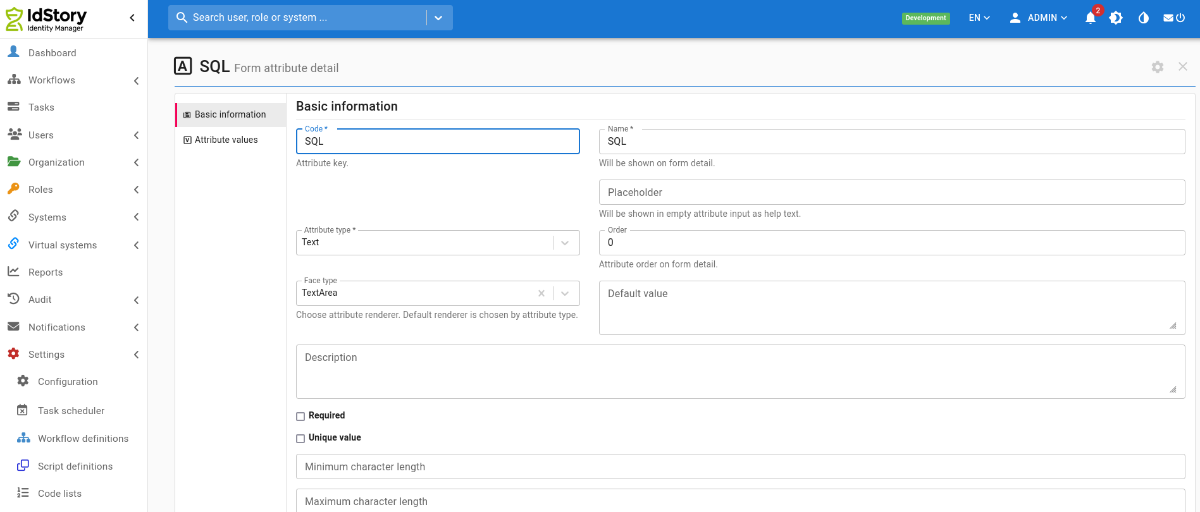
In code list create new attribute with name SQL, type Text and facetype TextArea. Code of attribute is set in configuration property <font 10ptwhite-space:pre;/inherit;;#000000;;#000000background-color:#ffffff;font-family:"Monospace";font-size:10pt;white-space:pre;>idm.sec.reports.sql.report.codelist.eav.code (already exists with default value).</font>
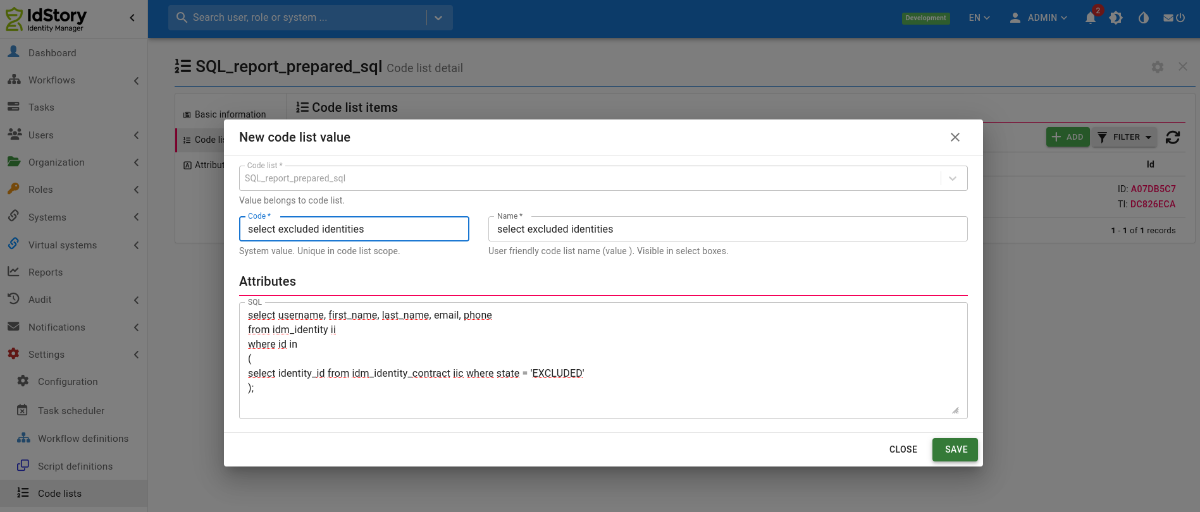
Create new item in code list. Code of item is identifier you select in report, in attribute SQL is prepared SQL for report.
Now we can create report using prepared SQL from code list.
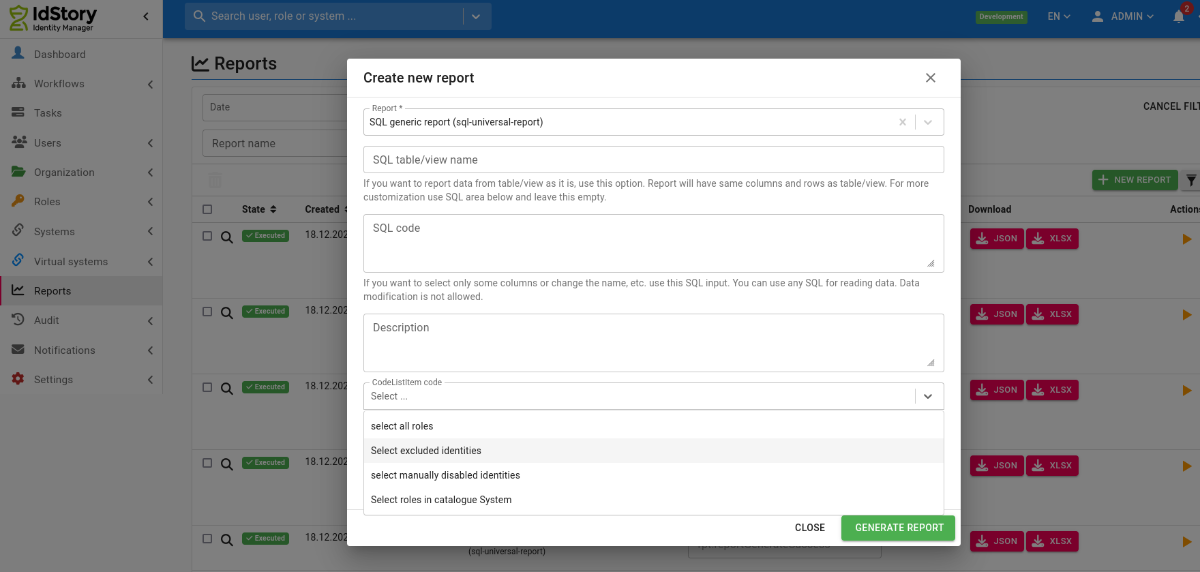
Mandatory config for classic installation
You need to configure an additional application.properties file. This report is using a separate datasource for safety reasons.
For example read only user for whole IdM database:
CREATE USER czechidm_report PASSWORD '***some secure password***';
GRANT CONNECT ON DATABASE czechidm TO czechidm_report;
\c czechidm;
REVOKE ALL ON SCHEMA public FROM public;
GRANT USAGE ON SCHEMA public TO public;
GRANT ALL ON SCHEMA public TO czechidm;
GRANT SELECT ON ALL TABLES IN SCHEMA public TO czechidm_report;
ALTER DEFAULT PRIVILEGES FOR ROLE czechidm IN SCHEMA public
GRANT SELECT ON TABLES TO czechidm_report;
\q
The properties you need to configure are specified below.
spring.reports-datasource.jdbcUrl=jdbc:postgresql://localhost:5432/hr
# name of the user, update this
spring.reports-datasource.username=czechidm_report
# password for the user, update this
spring.reports-datasource.password=keepass
spring.reports-datasource.driver-class-name=org.postgresql.Driver
spring.reports-datasource.testOnBorrow=true
spring.reports-datasource.validationQuery=SELECT 1
spring.reports-datasource.maximum-pool-size=5
spring.reports-datasource.read-only=true
Config for installation on IAM appliance
If you have IdM installed as IAM appliance, you have to follow the steps below in order to install and use the Reports module containing this report. Note that required version of CzechIdM container is at least 12.2.
Turn off IdM (this is neccessary because we will change DB permissions in the next steps):
systemctl stop iam-czechidm
Add the reports module to additional modules for your IdM installation:
Go to the internal database (you have to go inside the docker container and run psql inside) and create a separate user for running the SQL Universal report. For this report, always create a new user with only select permissions for the tables and views you need. Never use the same user you use for the standard IdM database. For example, a read only user for whole IdM database can be created as follows:
CREATE USER czechidm_report PASSWORD '***some secure password***';
GRANT CONNECT ON DATABASE czechidm TO czechidm_report;
\c czechidm;
REVOKE ALL ON SCHEMA public FROM public;
GRANT USAGE ON SCHEMA public TO public;
GRANT ALL ON SCHEMA public TO czechidm;
GRANT SELECT ON ALL TABLES IN SCHEMA public TO czechidm_report;
ALTER DEFAULT PRIVILEGES FOR ROLE czechidm IN SCHEMA public
GRANT SELECT ON TABLES TO czechidm_report;
\q
Back on the server (outside of the docker container), save the password of the user you just created to a separate file:
Finally, update the definition of the iam-czechidm service in the file /data/registry/node-active-config/docker-compose-czechidm.yml:
- CZECHIDM_REPORTS_DB_URL=jdbc:postgresql://czechidm-db:5432/czechidm
- CZECHIDM_REPORTS_DB_USER=czechidm_report
- CZECHIDM_REPORTS_DB_PASSFILE=/run/secrets/db_report.pwfile
- CZECHIDM_REPORTS_DB_DRIVERCLASS=org.postgresql.Driver
# add following new lines in the "volumes" section:
- type: bind
source: /data/volumes/czechidm/secrets/idm_db_report.pwfile
target: /run/secrets/db_report.pwfile
read_only: true
Start the IdM service:
When IdM starts up (it will take several minutes), login as admin and go to the Settings → Modules. Find the line with the Reports module and click on the Activate button.
Example SQL queries
A simple list of collected SQL queries over the new IdM database.
Most frequently used tables
| Table | Data |
|---|---|
| idm_identity | Identities (users) |
| idm_identity_contract | Contracts of the identities |
| idm_contract_guarantee | Managers of contracts of the identities |
| idm_identity_role | Roles assigned on the contracts of the identities |
| idm_role | Roles |
| idm_tree_node | Organizational structure (for all structure types) |
| idm_tree_type | Organizational structure types |
| idm_form_definition | Form definitions |
| idm_form_attribute | Form attributes - definition of all EAVs for all entity types |
| idm_identity_form_value, idm_i_contract_form_value, idm_role_form_value, … | Values of EAVs for the given entity types |
Finding an object by UUID
We are looking for an object (here an event) by the UUID that is displayed in IdM as 02fdad6a-1113-4102-bc7d-90fe64c2ed16.
PostgreSQL:
MS SQL Server. The UUID needs to be modified for the command - remove the dashes and prepend "0x":
Displaying the ID in the format shown in the GUI:
Queries over synchronization
Extracting the list of identifiers for a given synchronization run.
SELECT encode(transaction_id, 'hex')::uuid, creator FROM sys_sync_log WHERE synchronization_config_id = (SELECT sys_sync_config.id FROM sys_sync_config WHERE system_mapping_id = uuid_send('afb0af24-964f-406b-a5cf-e1fccf6c0911'::uuid))
-- I use the Transaction ID from your query here. This gives me the items for that one synchronization run. Extracting items in the UNLINKED or UNKNOWN state is done via a like query, there may be another/better way. So this returns all identifiers of items that are in the unlinked or unknown state
SELECT identification FROM sys_sync_item_log WHERE transaction_id = uuid_send('f47cfe6a-aa03-4a9c-9271-057bc1e173de'::uuid) AND (message LIKE '%UNLINKED%' OR message LIKE '%UNKNOWN%');
Extracting non-existing entities
This report serves as an overview of all accounts on connected systems that are not managed in IdM.
The report lists all records that are no older than one week. In IdM, some synchronizations often run regularly, so I have added a column with the name of the synchronization to the export, which you can use to filter further in SQL. For example, list only synchronizations that start with "Kontrolní synchronizace", etc.
LEFT JOIN sys_sync_log sync ON ssil.transaction_id = sync.transaction_id
LEFT JOIN sys_sync_action_log ssal ON ssil.sync_action_log_id = ssal.id
LEFT JOIN sys_sync_config ssc ON sync.synchronization_config_id = ssc.id
LEFT JOIN sys_system_mapping ssm ON ssc.system_mapping_id = ssm.id
LEFT JOIN sys_schema_obj_class ssoc ON ssm.object_class_id = ssoc.id
LEFT JOIN sys_system ss ON ssoc.system_id = ss.id
WHERE ssal.sync_action = 'MISSING_ENTITY' AND
EXTRACT(WEEK FROM ssal.created) = EXTRACT(WEEK FROM CURRENT_DATE)
AND EXTRACT(YEAR FROM ssal.created) = EXTRACT(YEAR FROM CURRENT_DATE)
ORDER BY ssil.display_name;
Queries over identities and accounts
Retrieving EAV attributes:
SELECT ii.username, ii.disabled, ifa.name, iifv.date_value FROM idm_identity_form_value iifv JOIN idm_identity ii ON iifv.owner_id=ii.id JOIN idm_form_attribute ifa ON iifv.attribute_id = ifa.id AND ifa.name IN ('vpnExpiration','sshExpiration') ORDER BY iifv.date_value
-- identity with EAV attribute mailType of type ShortText and value Exchange
SELECT ii.username, ii.disabled, ifa.name, iifv.short_text_value FROM idm_identity_form_value iifv JOIN idm_identity ii ON iifv.owner_id=ii.id JOIN idm_form_attribute ifa ON iifv.attribute_id = ifa.id AND ifa.name IN ('mailType') WHERE short_text_value='Exchange';
-- changes of the EAV attribute for contracts of a specific identity
SELECT created, short_text_value FROM idm_i_contract_form_value_a WHERE owner_id IN (SELECT iic.id FROM idm_identity_contract iic JOIN idm_identity ii ON iic.identity_id=ii.id WHERE ii.username='joe.doe');
List of accounts of an identity:
List of system identifiers of accounts (entities on a system) on a specific system created from a certain time and the login of the identity to which they belong:
List of accounts in the provisioning queue (active operations):
List of identities that have more than one valid contract:
Finding accounts that have no link via a role, are not in protected mode and are not accounts on the Vema system - instead of Vema, you need to add all source systems of identities to which provisioning does not occur: (ideally the result should be empty, unless additional or technical accounts are used in the environment)
Consistency check of identity accounts - whether a link to an account is created for each assigned role (empty result = all OK, non-empty may be the case for future contracts, otherwise it indicates a potential inconsistency). (For older versions of IdM, the command may report that srs.create_acc_by_default does not exist; in that case, the line with this condition can be removed.)
JOIN idm_identity_contract ic ON ic.identity_id=i.id
JOIN idm_identity_role ir ON ir.identity_contract_id=ic.id
JOIN idm_role r ON ir.role_id=r.id
LEFT JOIN sys_role_system srs ON srs.role_id=r.id
LEFT JOIN sys_system ss ON srs.system_id=ss.id
LEFT JOIN acc_identity_account aca ON i.id=aca.identity_id AND aca.identity_role_id=ir.id
WHERE aca.identity_role_id IS NULL AND srs.role_id IS NOT NULL
AND srs.create_acc_by_default=TRUE
AND (srs.forward_acm_enabled=TRUE OR ir.valid_from IS NULL OR ir.valid_from <now())
ORDER BY i.username
Check for duplicate paired accounts - cases where an identity has more than one account paired on a single "MS AD - Users" system (this is typically a problem if the additional accounts functionality is not used):
FROM idm_identity i
LEFT JOIN acc_identity_account aca ON i.id=aca.identity_id
LEFT JOIN acc_account aa ON aca.account_id=aa.id
LEFT JOIN sys_system s ON aa.system_id=s.id
LEFT JOIN idm_identity_form_value ifv ON i.id=ifv.owner_id AND ifv.attribute_id= ( SELECT ifa.id FROM idm_form_attribute ifa JOIN idm_form_definition ifd ON ifa.definition_id=ifd.id WHERE ifa.code='distinguishedName' AND ifd.definition_type='eu.bcvsolutions.idm.core.model.entity.IdmIdentity')
WHERE s.name='MS AD - Users'
AND i.username IN ( SELECT i.username FROM idm_identity i LEFT JOIN acc_identity_account aca ON i.id=aca.identity_id LEFT JOIN acc_account aa ON aca.account_id=aa.id LEFT JOIN sys_system s ON aa.system_id=s.id WHERE s.name='MS AD - Users' GROUP BY i.username HAVING COUNT(*)> 1 AND COUNT(DISTINCT aa.uid)> 1)
ORDER BY i.username, aa.id;
Finding which identity is affected by an error during the recalculation of dirty flags for contract slices:
Queries over assigned roles and attributes
Assigned roles and identities:
JOIN idm_identity_contract ic ON ic.identity_id=i.id
JOIN idm_identity_role ir ON ir.identity_contract_id=ic.id
JOIN idm_role r ON ir.role_id=r.id
ORDER BY r.name, i.username
List of identities that do not have a specific role assigned (in the select: "Název role")
JOIN idm_identity_contract ic ON ic.identity_id=i.id
LEFT JOIN idm_identity_role ir ON ir.identity_contract_id=ic.id AND ir.role_id IN (SELECT id FROM idm_role WHERE name ='Název role')
WHERE ir.id IS NULL
List of identities that have a specific role assigned (in the select: "Kód přidělené role") but do not have another role (in the select: "Kód NEpřidělené role"), together with information about the contract and the organizational placement.
JOIN idm_identity_contract ic ON ic.identity_id=i.id
LEFT JOIN idm_tree_node itn ON ic.work_position_id=itn.id
LEFT JOIN idm_identity_role ir ON ir.identity_contract_id=ic.id AND ir.role_id IN (SELECT id FROM idm_role WHERE code ='Kód NEpřidělené role')
JOIN idm_identity_role ir2 ON ir2.identity_contract_id=ic.id AND ir2.role_id IN (SELECT id FROM idm_role WHERE code ='Kód přidělené role')
WHERE ir.id IS NULL AND ir2.id IS NOT NULL
Assigned roles, including information whether the role is assigned as an automatic role on an organization:
JOIN idm_identity_contract ic ON ic.identity_id=i.id
JOIN idm_identity_role ir ON ir.identity_contract_id=ic.id
JOIN idm_role r ON ir.role_id=r.id
LEFT JOIN idm_auto_role ar ON ir.automatic_role_id=ar.id
ORDER BY i.username, r.name
Roles that are assigned as sub roles of some business role:
i.username,
ic.position,
r.code AS "kod role",
rd.code AS "kod nadrizene role",
ir.valid_from AS "prirazeni ROLE od",
ir.valid_till AS "prirazeni ROLE do",
direct.valid_from AS "prirazeni nadrazene ROLE od",
direct.valid_till AS "prirazeni nadrazene ROLE do"
FROM
idm_identity_role ir
JOIN idm_identity_contract ic ON
ic.id = ir.identity_contract_id
JOIN idm_identity i ON
i.id = ic.identity_id
JOIN idm_identity_role direct ON
direct.id = ir.direct_role_id
JOIN idm_role r ON r.id = ir.role_id
JOIN idm_role rd ON rd.id = direct.role_id ;
Values of role parameters with the code "amis_text" from the "roleParameters" definition:
"Duplicate" manually assigned roles across all roles of a user. These are not the classic duplicates on a single contract.
i.username,
r.code
FROM
idm_identity_role ir
JOIN idm_identity_contract ic ON
ic.id = ir.identity_contract_id
JOIN idm_identity i ON
i.id = ic.identity_id
JOIN idm_role r ON
r.id = ir.role_id
WHERE
1 < (
SELECT
COUNT(*)
FROM
idm_identity_role ir2
JOIN idm_identity_contract ic2 ON
ic2.id = ir2.identity_contract_id
JOIN idm_identity i2 ON
i2.id = ic2.identity_id
WHERE
ir2.role_id = ir.role_id
AND i2.id = i.id)
AND ir.automatic_role_id IS NULL
AND ir.role_composition_id IS NULL;
Query to detect duplicates in assigned automatic roles - in case of an incorrect invocation of save, two recalculations may occur for one identity and both may assign the same role. Be careful when deleting these identity roles; also delete other links such as sub-roles or accounts.
*
FROM
idm_identity_role ir
WHERE
(
SELECT COUNT(*)
FROM
idm_identity_role ir2
WHERE
ir.identity_contract_id = ir2.identity_contract_id
AND ir2.automatic_role_id = ir.automatic_role_id) > 1;
Queries over automatic roles
Listing of all automatic roles by attributes and rules, on which attributes they are set: (automatic role ID, automatic role name, role code, role name, attribute code in the automatic role rule, attribute type, comparison, value in the automatic role rule)
FROM idm_auto_role iar
JOIN idm_role ir ON iar.role_id=ir.id
JOIN idm_auto_role_attribute iara ON iar.id=iara.id
JOIN idm_auto_role_att_rule iarar ON iara.id=iarar.auto_role_att_id
LEFT JOIN idm_form_attribute ifa ON iarar.form_attribute_id=ifa.id ORDER BY ir.code, iar.id, attribute_code
Listing of all automatic roles by organization (note: only automatic roles set directly on the given organization, does not take inheritance into account):
JOIN idm_tree_node tn ON rtn.tree_node_id=tn.id
JOIN idm_role r ON ar.role_id=r.id
Listing of all automatic roles for an organization that it inherited from parent organizations (only roles inherited from parents - directly set roles see query above):
JOIN idm_forest_index ifi ON ifi.content_id = itn.id
JOIN idm_forest_index ifiparents ON ifi.lft> ifiparents.lft AND ifi.rgt <ifiparents.rgt AND ifi.forest_tree_type=ifiparents.forest_tree_type
JOIN idm_tree_node itnparents ON ifiparents.content_id=itnparents.id
LEFT JOIN idm_role_tree_node irtn ON irtn.tree_node_id=itnparents.id AND irtn.recursion_type='DOWN'
LEFT JOIN idm_auto_role iar ON irtn.id=iar.id
LEFT JOIN idm_role ir ON iar.role_id=ir.id
WHERE ir.code IS NOT NULL AND itn.code='kód organizace, pro kterou mě zajímají zděděné role';
Finding all organizations that are leaves (have no more subordinate organizations) and at the same time have no automatic role:
WHERE tn.id NOT IN (SELECT tree_node_id FROM idm_role_tree_node)
AND tn.id NOT IN (SELECT parent_id FROM idm_tree_node WHERE parent_id IS NOT NULL) ORDER BY tn.code
Finding whether any automatic role assignment by organization is missing (works only on automatic roles with the No-propagation strategy). Ideally, the result should be empty.
JOIN idm_identity_contract ic ON ic.identity_id=i.id AND (ic.valid_till IS NULL OR ic.valid_till > now()) AND (ic.state IS NULL OR ic.state != 'DISABLED')
JOIN idm_tree_node itn ON itn.id=ic.work_position_id
JOIN idm_role_tree_node irtn ON irtn.tree_node_id=itn.id
JOIN idm_auto_role ar ON irtn.id=ar.id LEFT JOIN idm_identity_role ir ON ir.automatic_role_id=irtn.id WHERE ir.id IS NULL;
Queries over roles and systems
Extracting the values and strategies that roles populate for a specific attribute on a specific system:
FROM sys_role_system_attribute srsa
JOIN sys_role_system srs ON srsa.role_system_id=srs.id
JOIN sys_system ss ON srs.system_id=ss.id JOIN idm_role ir ON ir.id=srs.role_id
WHERE srsa.name = 'profiles' AND ss.name = 'Golem GCD Test Koop - operátoři' ORDER BY ir.code,ss.name, srsa.name;
Listing of the flags "Forward account management", "Automatically create accounts" and "Skip value if contract is excluded" for roles that correspond to AD groups placed in OU=Mail
FROM idm_role r
JOIN sys_role_system rs ON r.id=rs.role_id
JOIN sys_role_system_attribute rsa ON rs.id=rsa.role_system_id AND rsa.name='ldapGroups'
WHERE rsa.transform_script LIKE '%OU=Mail%'
Roles and permissions
List of roles with information about which permissions they grant: (but note that this does not show the contents of "Configuration" = evaluator_properties, because it is binary, but it may also contain important settings, e.g. the "Use permissions" option in IdentityContractByIdentityEvaluator)
Roles, priority and guarantors
Simple list of roles with information: can be requested, priority, role catalogue placement, role authorizers - defined by name or role.
rc.name AS catalogue, i.username as role_guarantor_direct, g2.code as role_guarantor_role_code
FROM idm_role r
LEFT JOIN idm_role_guarantee g ON r.id = g.role_id
LEFT JOIN idm_identity i ON i.id = g.guarantee_id
LEFT JOIN idm_role_guarantee_role gr ON r.id = gr.role_id
LEFT JOIN idm_role g2 ON g2.id = gr.guarantee_role_id
LEFT JOIN idm_role_catalogue_role rcr ON rcr.role_id = r.id
LEFT JOIN idm_role_catalogue rc ON rc.id = rcr.role_catalogue_id
Queries over virtual systems
Accounts and their attributes in the AMIS virtual system:
Whether the approval of requests by the implementer is set on virtual systems:
JOIN idm_form_attribute ifa ON ssfv.attribute_id = ifa.id AND ifa.code IN ('requiredConfirmation')
JOIN idm_form_definition ifd ON ifa.definition_id=ifd.id
ORDER BY ss.name, ifd.code
Accounts and their attributes exported together on one line:
copy (select login, string_agg(hodnota, ';') from (SELECT vs.uid as login, ifa.code, string_agg(vsfv.string_value, ',') as hodnota FROM vs_account_form_value vsfv JOIN idm_form_attribute ifa ON vsfv.attribute_id=ifa.id JOIN idm_form_definition ifd ON ifa.definition_id=ifd.id AND ifd.name LIKE 'Virtual system for %HP%' JOIN vs_account vs ON vs.id=vsfv.owner_id group by vs.uid, ifa.code order by vs.uid,ifa.code) as test group by login) TO '/tmp/hpux_lepsi_export_2019-09-13.csv' CSV HEADER DELIMITER ';';
Accounts from a virtual system that are not paired with any identity:
Queries over events
Events are in two tables: idm_entity_event and idm_entity_state. The idm_entity_state table contains a record for an event once it has started being processed; not before that. However, the idm_entity_state table also contains other things that are not only related to events (e.g. dirty flags from contract slice synchronization), so be careful when deleting.
Listing of pending events caused by role assignment - identity and role:
LEFT JOIN idm_identity_role ir ON ee.owner_id=ir.id
LEFT JOIN idm_role r ON ir.role_id=r.id
LEFT JOIN idm_identity_contract ic ON ir.identity_contract_id=ic.id
LEFT JOIN idm_identity i ON ic.identity_id=i.id
WHERE ee.result_state='CREATED' AND ee.owner_type='eu.bcvsolutions.idm.core.model.entity.IdmIdentityRole'
Queries over organizations
List of organizational nodes with the full path within the organizational tree and with one EAV:
FROM idm_tree_node itn
LEFT JOIN idm_forest_index ifi ON ifi.content_id = itn.id
LEFT JOIN idm_forest_index ifiparents ON ifi.lft> ifiparents.lft AND ifi.rgt <ifiparents.rgt AND ifi.forest_tree_type=ifiparents.forest_tree_type
LEFT JOIN idm_tree_node itnparents ON ifiparents.content_id=itnparents.id
LEFT JOIN idm_tree_node_form_value eav ON eav.owner_id = itn.id AND eav.attribute_id IN (SELECT ifa.id FROM idm_form_attribute ifa JOIN idm_form_definition ifd ON ifa.definition_id=ifd.id WHERE ifa.code='zkratkaKlinky' AND ifd.definition_type='eu.bcvsolutions.idm.core.model.entity.IdmTreeNode')
GROUP BY itn.code, itn.name, eav.short_text_value;
List of other positions of an identity, including the type of organizational structure:
JOIN idm_identity_contract iic ON icp.identity_contract_id=iic.id
JOIN idm_identity ii ON iic.identity_id=ii.id
JOIN idm_tree_node itn ON icp.work_position_id=itn.id
JOIN idm_tree_type itt ON itn.tree_type_id=itt.id
WHERE ii.username='loginuzivatele'
Queries over contracts
List of user contracts that are duplicates (have no link or the same link to the organizational structure, the same state, the same valid_till)
FROM idm_identity_contract ic
JOIN idm_identity i ON ic.identity_id=i.id
LEFT JOIN idm_tree_node tn ON ic.work_position_id=tn.id
GROUP BY i.username, ic.identity_id, ic.work_position_id, tn.code, ic.state, ic.valid_till
HAVING COUNT(*)> 1;
Queries regarding transformation scripts
When I need to find out whether a Groovy script is used in some transformation to/from a system, this is not visible in the "Script usage" agenda, because in transformations the scripts are identified only by their codes.
Transformation scripts used in attribute mapping on a system:
-- Including identification of the system and the attribute name
SELECT ss.name, ssam.name,transform_from_res_script, transform_to_res_script FROM sys_system_attribute_mapping ssam JOIN sys_system_mapping AS ssm ON ssam.system_mapping_id=ssm.id JOIN sys_schema_obj_class ssoc ON ssm.object_class_id=ssoc.id JOIN sys_system AS ss ON ssoc.system_id=ss.id WHERE transform_from_res_script IS NOT NULL OR transform_to_res_script IS NOT NULL ORDER BY ss.name, ssam.name ;
Transformation scripts used in attribute mapping on a system - those that are in the script library:
Transformation scripts used in roles:
Transformation scripts used in roles, including information about the role:
Queries/reports over audits
Report of arrivals and departures of identities over the last 30 days - i.e. changes of identity state in the last 30 days (and note that the query may theoretically contain extra records if several arrivals and departures were performed on a given identity in that period):
FROM (
SELECT i.id, to_timestamp(MAX(a.timestamp/1000)) AS datum_zmeny_stavu, 'Nastup' AS typ_zmeny
FROM idm_audit a
JOIN idm_identity i ON a.entity_id=i.id
WHERE a.changed_attributes LIKE '%state%' AND i.state IN ('FUTURE_CONTRACT', 'VALID') AND to_timestamp(a.timestamp/1000)> NOW() - INTERVAL '30 days'
GROUP BY i.id
UNION
SELECT i.id, to_timestamp(MAX(a.timestamp/1000)) AS datum_zmeny_stavu, 'Odchod' AS typ_zmeny
FROM idm_audit a
JOIN idm_identity i ON a.entity_id=i.id
WHERE a.changed_attributes LIKE '%state%' AND i.state IN ('LEFT') AND to_timestamp(a.timestamp/1000)> NOW() - INTERVAL '30 days'
GROUP BY i.id
) AS all_i
JOIN idm_identity i ON all_i.id=i.id
JOIN idm_identity_contract ic ON all_i.id=ic.identity_id
AND ((all_i.typ_zmeny='Nastup' AND (ic.valid_till IS NULL OR ic.valid_till> now()) AND ic.state IS NULL)
OR
(all_i.typ_zmeny IN ('Odchod') AND (ic.valid_till <now() OR ic.state = 'DISABLED')))
LEFT JOIN idm_tree_node tn ON ic.work_position_id=tn.id
LEFT JOIN idm_tree_node tnparent ON tn.parent_id=tnparent.id
LEFT JOIN idm_i_contract_form_value icfv ON icfv.owner_id=ic.id AND icfv.attribute_id IN (SELECT id FROM idm_form_attribute WHERE code='misto_vykonu_prace')
LEFT JOIN idm_contract_guarantee cg ON cg.identity_contract_id=ic.id
LEFT JOIN idm_identity iguar ON iguar.id=cg.guarantee_id
ORDER BY i.username
TOKEN queries for identities
A useful query if you want to find out who is logged in.
t.id,
t.created,
t.expiration,
t.issued_at,
i.username
FROM
idm_token t
LEFT JOIN idm_identity i ON
i.id = owner_id
WHERE
t.token_type = 'CIDMST'
AND t.owner_type = 'eu.bcvsolutions.idm.core.model.entity.IdmIdentity'
ORDER BY
created DESC;
Queries over the scheduler
The following SQL statement displays all scheduled tasks in the scheduler. If the execution is scheduled by time, it also displays this time (cron_expression). Note that it does not display scheduled executions chained after another task.
FROM qrtz_job_details qjd
LEFT JOIN qrtz_triggers qt ON qjd.job_name=qt.job_name
LEFT JOIN qrtz_cron_triggers qct ON qt.trigger_name=qct.trigger_name;
The following SQL statement displays all records that are currently in the queue of a stateful task (e.g. HrEnableContractProcess):
ii.username, ii.first_name, ii.last_name, ii.external_code, ii.state AS identity_state, iic.valid_from, iic.valid_till, iic.state AS contract_state,
SUBSTRING(qjd.job_class_name FROM '[^\.]+$') AS task_name
FROM idm_processed_task_item pti
LEFT JOIN idm_scheduled_task ist ON pti.scheduled_task_queue_owner = ist.id LEFT JOIN qrtz_job_details qjd ON qjd.job_name=ist.quartz_task_name
LEFT JOIN idm_identity_contract iic ON pti.referenced_entity_id=iic.id
LEFT JOIN idm_identity ii ON iic.identity_id=ii.id
WHERE pti.scheduled_task_queue_owner IS NOT NULL
AND qjd.job_class_name LIKE '%HrEnableContractProcess'
ORDER BY pti.created DESC;
The following SQL statement displays all records that have historically been processed by some stateful task (e.g. HrEnableContractProcess) (this does not mean that they are still in the queue; they may also appear in the result multiple times):
ii.username, ii.first_name, ii.last_name, ii.external_code, ii.state AS identity_state, iic.valid_from, iic.valid_till, iic.state AS contract_state,
SUBSTRING(lrt.task_type FROM '[^\.]+$') AS task_name
FROM idm_processed_task_item pti
LEFT JOIN idm_long_running_task lrt ON lrt.id=pti.long_running_task
LEFT JOIN idm_identity_contract iic ON pti.referenced_entity_id=iic.id
LEFT JOIN idm_identity ii ON iic.identity_id=ii.id
WHERE pti.long_running_task IS NOT NULL
AND lrt.task_type LIKE '%HrEnableContractProcess'
ORDER BY pti.created DESC;
Queries over activity (workflow) tables
Information about deployed workflows
The first command contains a record of every upload of a new workflow version (both automatically and manually). The second command provides an overview of versions. Different workflows apparently generate IDs in different ways, which is strange, but it probably has no effect on functionality.
SELECT id_, name_, rev_, key_, version_, resource_name_ FROM act_re_procdef ORDER BY key_;
Workflow approvers report
Finds out who and when approved a specific role for a specific user.
FROM idm_identity ii1
JOIN act_hi_varinst v1 ON uuid_send(v1.text_::uuid) = ii1.id AND v1.name_ = 'applicantIdentifier'
JOIN act_hi_procinst p ON p.id_ = v1.proc_inst_id_
JOIN act_hi_varinst v2 ON p.id_ = v2.proc_inst_id_ AND v2.name_ = 'processInstanceName'
LEFT JOIN act_hi_varinst v3 ON p.id_ = v3.proc_inst_id_ AND v3.name_ = 'decision'
LEFT JOIN act_hi_varinst v4 ON p.id_ = v4.proc_inst_id_ AND v4.name_ = 'implementerIdentifier'
LEFT JOIN act_hi_taskinst t ON t.proc_inst_id_ = p.id_
LEFT JOIN idm_identity ii2 ON uuid_send(t.assignee_::uuid) = ii2.id
WHERE ii1.username= 'jdoe' AND v2.text_ LIKE '%manager_obchod%';
Database structure
Listing of all tables and their columns and information about them.