

Modules - Recertification (IdM 15+) [rec]
The Recertification module in Identity Management (IdM) gives the ability to perform regularly scheduled, or individual recertification requests of assigned permissions in IdM. The recertification requests will initiate an approval process at the end of which, the permissions are either retained (recertified) or removed as no longer needed. This increases the overall security level provided by the IdM, since it prevents accumulation of unnecessary permissions on individuals over time.
The module allows administrators (or others to):
- Run recertification tasks on identities, roles or accounts
- Schedule regular recertification tasks for a given organizational structure
- Schedule regular recertification tasks for roles, run periodically since last assignment or recertification
- Recertify roles assigned to accounts - personal, other personal and technical accounts (technical accounts with the module tech) - together with the roles assigned to contracts or separately
- Configure the approval process and workflow used in the recertification process
Version
| Version | Compatible with product | Notes |
|---|---|---|
| earlier | see Recertification (IdM 14) | earlier versions of the module |
| 15.0.0 | 15.5.0 | Reworked rec module, new approval processes and workflows |
| 15.3.0 | 15.20.0 | Recertification of roles assigned to accounts (personal, other personal and technical accounts) |
| 16.2.0 | 16.4.0 | Recertification of roles assigned to accounts for IdM 16 (the same as 15.3.0) |
"Compatible with the product" means that this is the recommended product version
Documentation Structure
- Features of the recertification module - This section provides an overview of all operations regarding recertifications that can be performed within IdM
- Installation - Describes the installation process and basic configuration of the Recertification module.
- Getting Started - Includes the initial steps required for the user to start working with the module.
- Regular recertifications - Describes how to schedule regular recertification events
- Types of Users - Provides a brief overview of the different user roles involved in working with the Recertification module. It outlines each role’s responsibilities, permissions, and how they interact with recertifications within the system.
Features of the recertification module
- Recertification request entity contains information about a single recertification - this usually consists of recertifying multiple IdmIdentityRole (role assigned to identity) or AccAccountRoleAssignment (role assigned to account) relationships. A request of the type Roles assigned to account groups the roles assigned to one account.
- Recertifications list is an agenda, that the administrator can use to keep track of ongoing or completed recertifications, as well as the status of their approval tasks.
- Recertify user bulk action is used to run a recertification per identity, triggered from the identities agenda. It can recertify the roles on the user's personal and other personal accounts as well.
- Recertify role bulk action is used to run a recertification per role definition, triggered from the roles agenda. It can recertify the role assigned to personal, other personal and technical accounts as well.
- Recertificate assigned roles bulk action in the account agendas is used to recertify the roles assigned to the selected accounts, one recertification request per account
- Recertificate assigned roles bulk action in the technical accounts agenda (module tech) is used to recertify the roles assigned to the accounts of the selected technical accounts
- Recertification event approval process and related approval task type is used to configure the approval workflow for recertifications
- Scheduled task: Regularly scheduled assigned role recertification according to the given interval is used to schedule regular, per-role recertifications that run periodically from role assignment date or last recertification date, for roles assigned to contracts and to accounts
- Scheduled task: Recertification of assigned roles (formerly Recertification of users' assigned roles) is used to recertify roles assigned to contracts and to accounts, restricted by roles, role catalogues, organizational structure and systems, with a fixed period (e.g. every 365 days)
- Scheduled task: Remove roles after forced recertification's end is a system task, that is automatically scheduled daily and removes roles where recertification has expired and is set to "hard" recertification
- Role recertification tab on the account detail shows the roles directly assigned to the account and the date of their last recertification
Installation
This section describes the installation process of the Recertification module, including its activation, required prerequisites, and access rights configuration. It serves as a starting point for administrators when introducing the module into the IdM environment.
The module requires the module acc (accounts). Recertification of roles assigned to technical accounts requires the module tech installed and enabled - without it, the options for technical accounts are not offered anywhere. The bulk action in the technical accounts agenda, the approval node Approve by technical asset holder and the Role recertification tab on the technical account detail require the module tech 15.5.0 (16.4.0 on IdM 16) or newer.
Configuration
The recertification module needs the "Role assignment recertification" approval process configured. To configure it, first create an approval workflow, as described in WF Engine documentation. Then in the Settings > Approval Processes page, select CREATE to make a new approval process and configure it like in the example (of course, with your workflow).
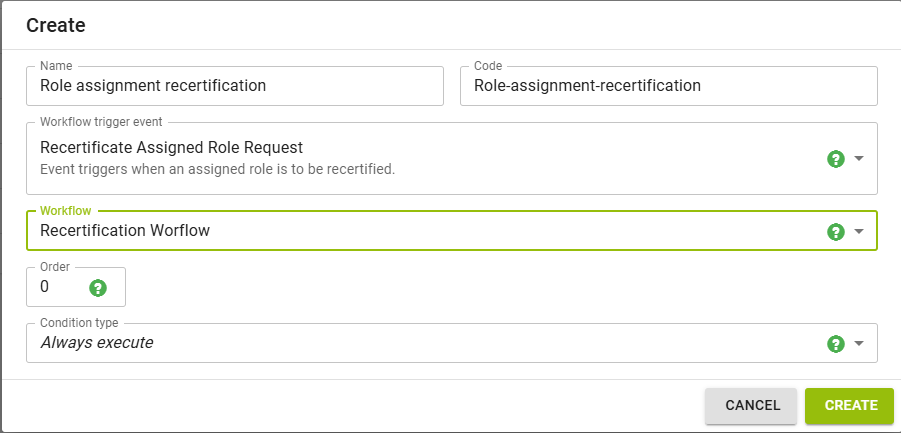
The recertification interval idm.sec.rec.configuration.recertificationInterval (in days, 0 = disabled) applies to the roles assigned to accounts as well: a role recertified within the interval is not recertified again by the bulk actions and by the scheduled task Recertification of assigned roles. The scheduled task Regularly scheduled assigned role recertification according to the given interval does not use it, its own interval decides.
Approvers of roles assigned to accounts
Roles assigned to accounts are approved by the same approval process and workflow as roles assigned to contracts. The approval nodes resolve the approvers by the owner of the account:
- Approve by manager/guarantor - managers of the main contract of the identity owning a personal or other personal account (managers of all its contracts, when the identity has no main contract), guarantors of a technical account. When the owner has no manager, the default approvers are used.
- Approve by technical asset holder (module tech) - holders of the technical asset of the technical account. The node is applicable to roles assigned to technical accounts only - for roles assigned to contracts or to personal accounts it ends with an error, so the workflow has to branch on the process variable context before this node.
Conditions on the approved role (criticality, role catalogue, guarantee type) work for roles assigned to accounts as well.
The process variable context tells what the recertified role is assigned to: CONTRACT, PERSONAL, PERSONAL_OTHER or TECHNICAL. The workflow can use the variables contractPosition, accountUid, systemName, account and accountRole as well.
The name of the approval task tells what the role is assigned to:
- Approval of recertification of role R assigned to contract P
- Approval of recertification of role R assigned to personal account U (on system S)
- Approval of recertification of role R assigned to other personal account U (on system S)
- Approval of recertification of role R assigned to technical account U (on system S)
The detail of an approval task for a role assigned to an account shows the account, the recertification request, the owner of the account (identity or technical account), the role assignment and the role.
Getting Started
If your IdM is in production with users requesting roles and being assigned manual roles, there are probably already plenty of opportunities to run a recertification.
Triggering and completing a recertification on users
To start a recertification on users, navigate to the "Users" agenda, select the users you wish to run recertification on and using the bulk action menu, select the "Recertificate assigned roles" action: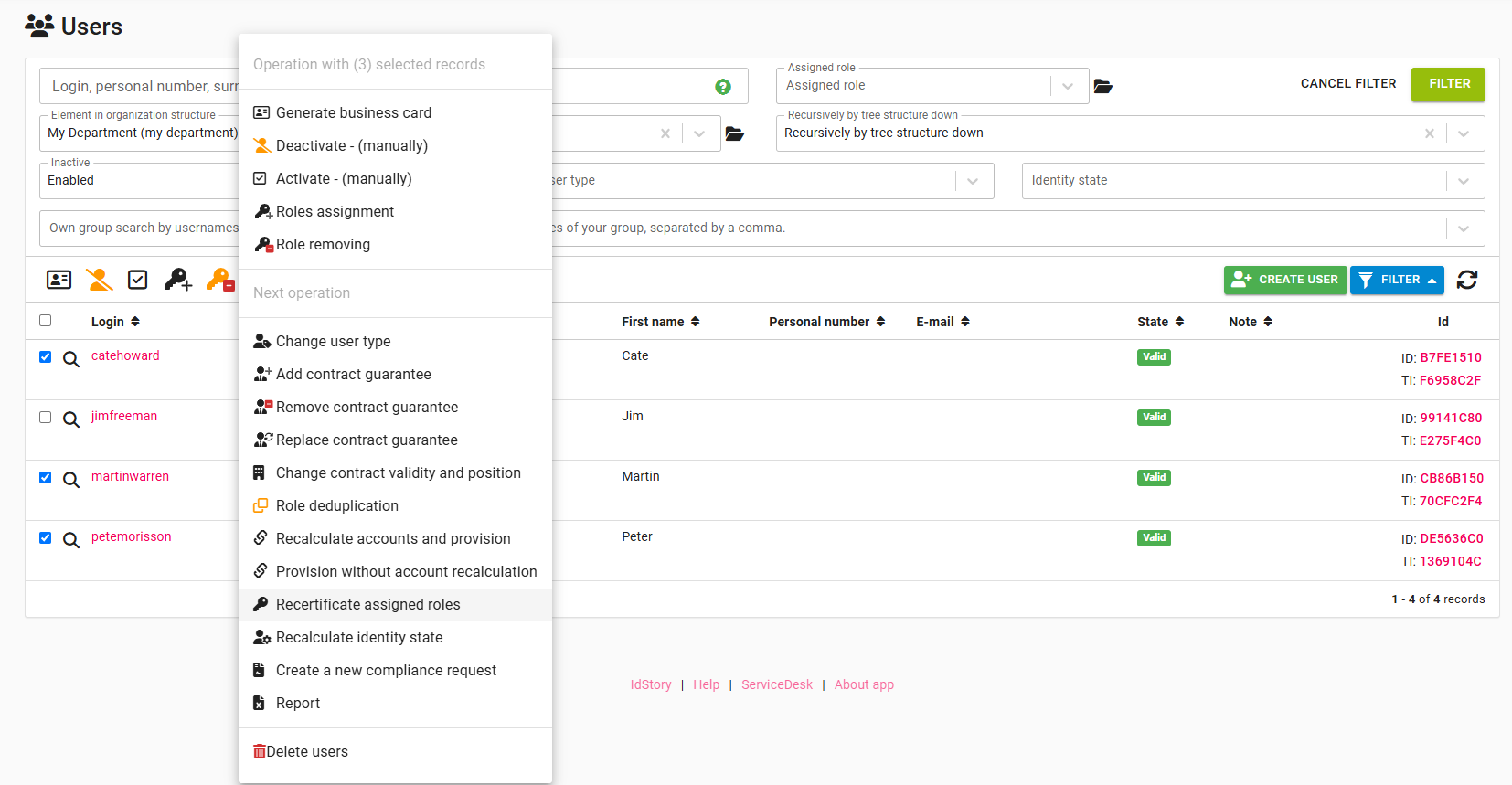 A modal dialog with recertification options will appear:
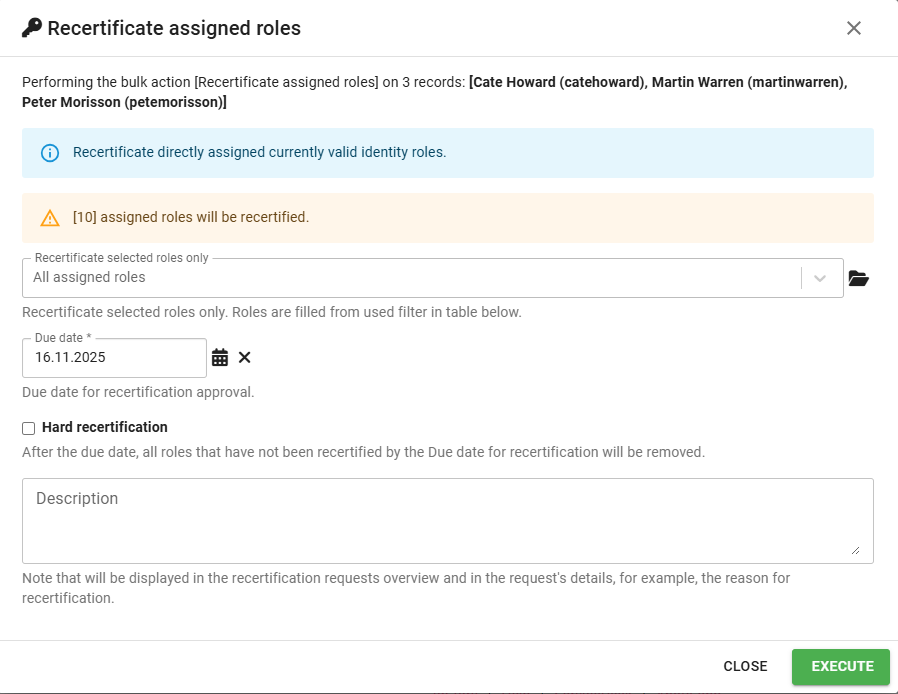
- Recertificate assigned roles only allows you to restrict the recertification only to certain roles, default is that all manually assigned roles are recertified.
- Recertificate roles assigned to contracts (checked by default), Recertificate roles on personal accounts and Recertificate roles on other personal accounts (unchecked by default) select what is recertified - roles assigned to the user's contracts, roles on the accounts owned by the user, or both. Roles on accounts are added to the same recertification request of the user. At least one of them has to be checked, otherwise the action ends with Nothing to recertificate.
- Due date is the date by which the recertification will expire and all remaining recertification tasks will be closed.
- Hard recertification means, that if the recertification expires, all unapproved tasks will be rejected and the roles removed automatically.
- Description can be used to add audit notes to the recertification, but also to provide instructions or information to approvers. The description is visible in the approval tasks.
The dialog shows the number of role assignments that will be recertified. The number is updated when you change the checkboxes or the selected roles.
When you are satisfied with the properties, you can click "Execute" to trigger the recertification. To see the recertifications in progress, navigate to Roles > Recertification agenda: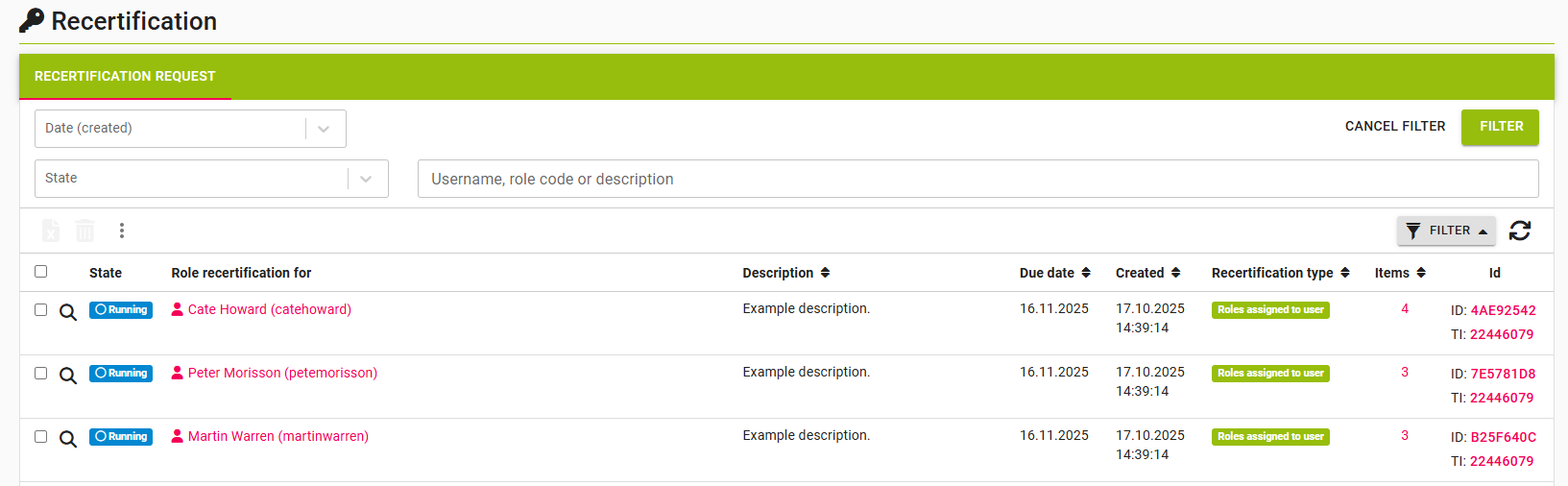 The "Recertificate assigned roles" bulk action that we used in this example has created a recertification request for each of the selected users, each recertification request will then contain their assigned roles as items (see items column in the screenshot)
You can use filters in this agenda to quickly find the relevant recertification requests based on the entity being recertified, date created or state. By clicking on the magnifying glass, you can see a detail of each recertification request, as well as its items: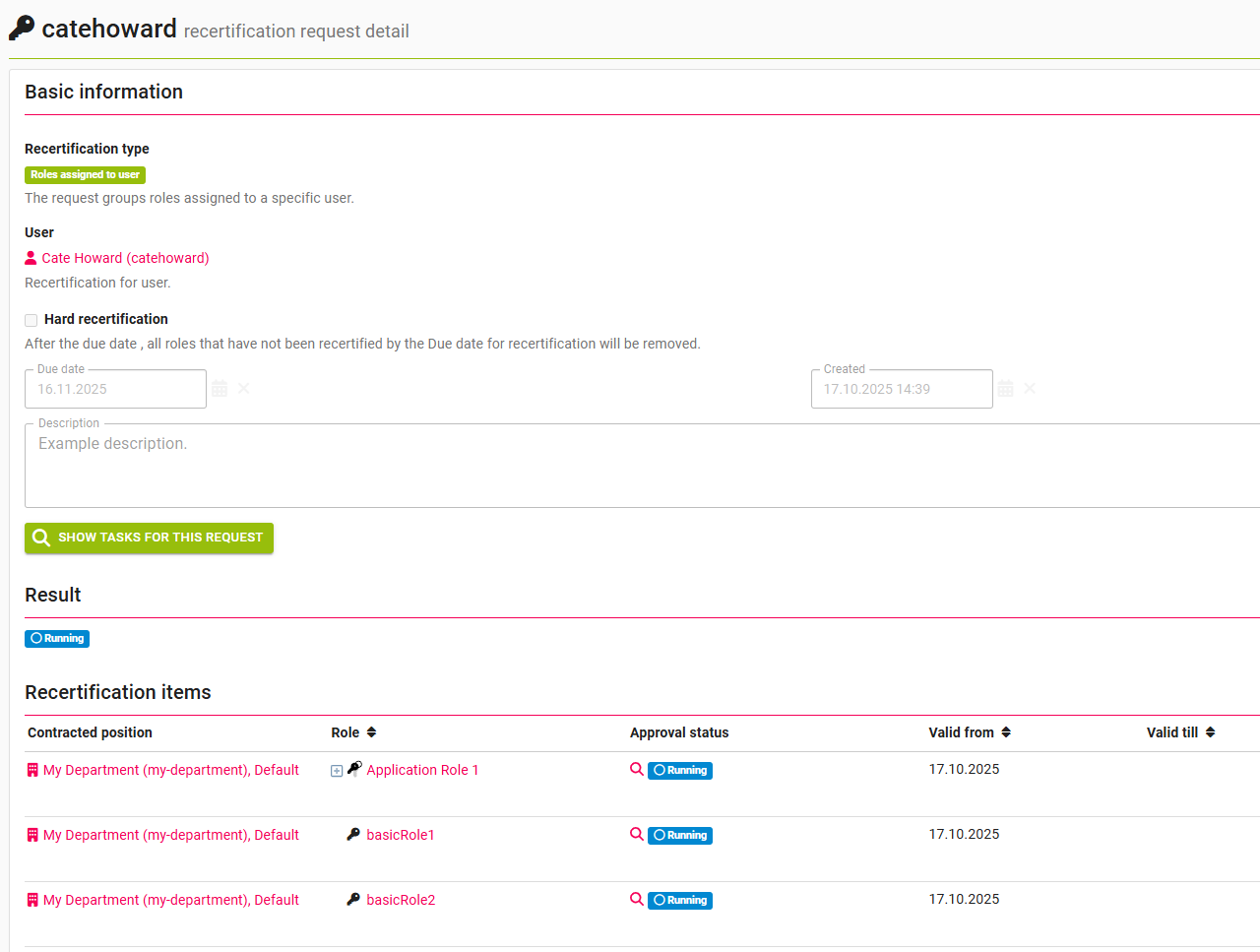 The detail page shows all the properties of the recertification request as well as the state of each of the recertification items.
You can see the relevant approval tasks for this recertification by using the show tasks for this request button, or individually for each item, by using the magnifying glass next to the approval status. When all approval tasks are resolved (approved, or rejected), the recertification will change state to Executed Any roles that had been rejected will be removed from the user, in our example, basicRole2 was not approved and thus is removed from the user.
Recertify a role
Process to recertify a role is quite similar, but instead of the users agenda, trigger the recertification bulk action from the Roles agenda.
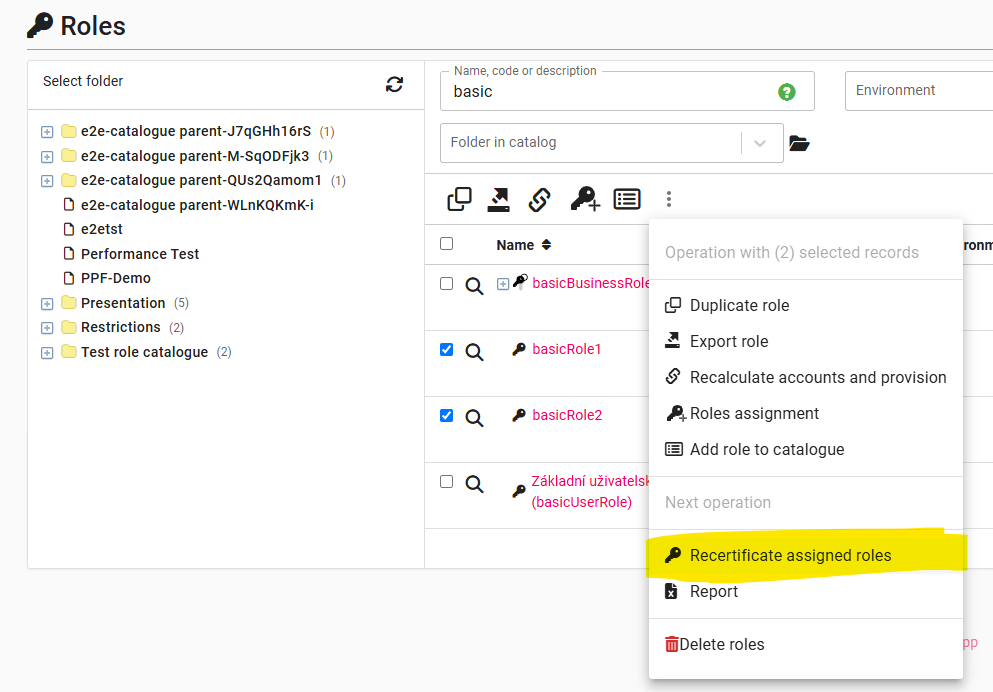
The recertification created this way has the exact same life-cycle as recertifications triggered from the users agenda, the only exception being that here a recertification item will be a user.
The role bulk action offers the checkboxes Recertificate roles assigned to user (checked by default), Recertificate roles on personal accounts, Recertificate roles on other personal accounts and Recertificate roles on technical accounts (unchecked by default, the last one only with the module tech). The assignments of the role on accounts are added to the same recertification request of the role.
Recertify roles assigned to accounts
To recertify roles assigned to accounts, select the accounts in an account agenda - Personal accounts, Accounts with role, the Accounts tab of a user or the accounts of a system - and run the bulk action Recertificate assigned roles. The action is not offered in the All accounts agenda. The dialog has no checkboxes, the selection decides what is recertified; Due date, Hard recertification and Description have the same meaning as for users.
The action creates one recertification request of the type Roles assigned to account for every selected personal and other personal account (and technical account, when the module tech is installed). The items of the request are the roles directly assigned to the account. Accounts of other types are skipped (Account skipped), accounts without directly assigned roles are reported as Recertification request is empty.
Rejected roles (and roles not decided until the due date of a hard recertification) are removed from the account by a role request of the account owner, executed without approval. A role on an account linked to another identity as well cannot be removed this way - its item ends as not executed with the reason Role on the account cannot be removed.
The Role recertification tab on the account detail shows the roles directly assigned to the account (without automatic roles) and the date of their last recertification. With the module tech, the tab is on the detail of a technical account as well.
Roles assigned to technical accounts (module tech) can be recertified from the Technical accounts agenda as well: select the technical accounts and run Recertificate assigned roles. The action of the module tech only finds the accounts of the selected technical accounts and hands them over to the recertification module, so the recertification runs as two long running tasks. Technical accounts without an account on a target system are skipped. The action is offered only when the recertification module supporting accounts is installed.
Regular recertifications
There are two options to schedule regular recertifications, both using scheduled tasks:
- Recertification of assigned roles (formerly Recertification of users' assigned roles) is used for running recertification of roles assigned to contracts and to accounts with a fixed interval (e.g. 365 days) and restrict the run to certain roles, role catalogues, organizational units or systems, see Recertification of assigned roles.
- Regularly scheduled assigned role recertification according to the given interval is a new scheduled task that allows for more sophisticated scheduling of recertifications for roles.
Regularly scheduled assigned role recertification according to the given interval
This scheduled task's purpose is to schedule regular recertifications in such a way, that the approvers are not swarmed by hundreds of approval tasks at the same date every year, but rather the recertification requests are spread out throughout time. The principle is that the recertifications are scheduled at an "anniversary" of role assignment. For simplicity, let's say we have users Bob, Alice and Charlie:
- Bob has role A assigned since April 1st this year
- Alice has role A assigned since June 1st this year
- Charlie has role A assigned since April 15th, but two years ago.
- The admin schedules the Regularly scheduled assigned role recertification according to the given interval task on Dec 1st with a period of 365 days
What happens is:
- Charlie gets a recertification triggered immediately, since his role has been assigned for more than 365 days. He will then get a recertification event on every Dec 1st.
- Bob will get recertified on April 1st, when his role assignment has reached 365 days
- Alice will get recertified on June 1st.
This is different to the Recertification of assigned roles scheduled task. If we use that one in the same example:
- Charlie, Bob and Alice will all three immediately get recertified and then will receive the same recertification on Dec 1st every year.
In both cases, the same recertification workflow is used (and the same as in individual recertifications).
To configure the scheduled task, you use the properties below:
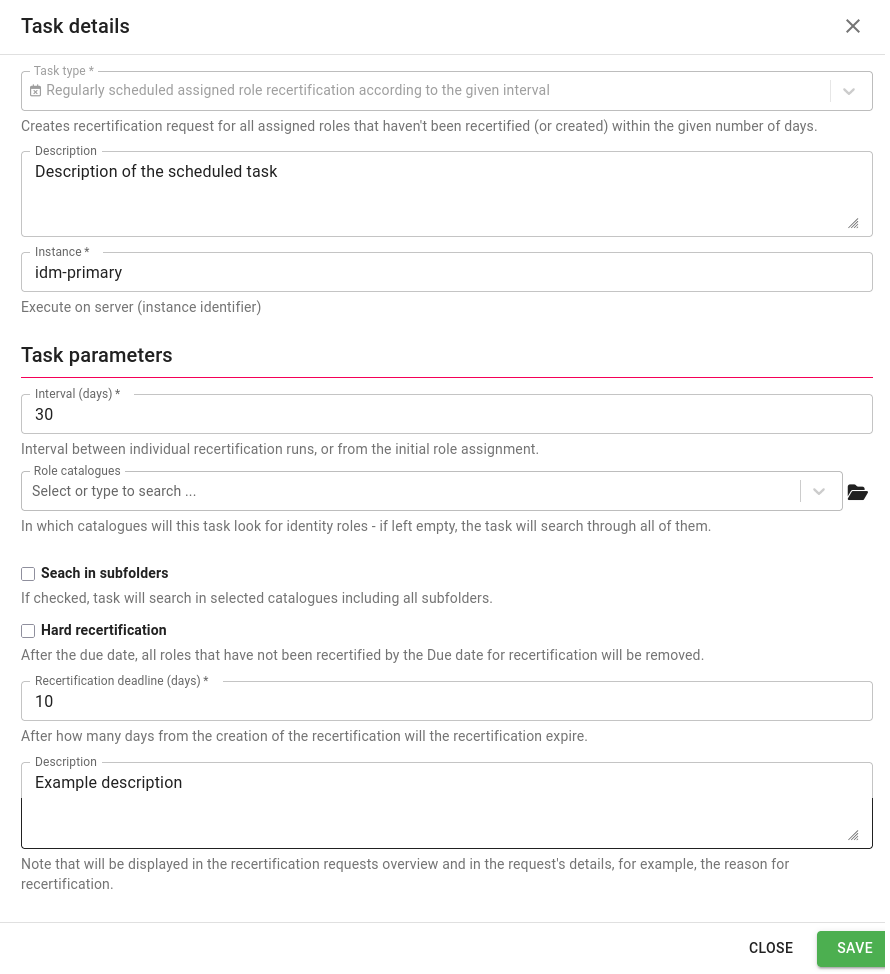
- Interval is the interval between recertifications (see example above for explanation)
- Role catalogues catalogue to recertify with these parameters (applies to roles assigned to accounts as well)
- Search in subfolders defines if search for roles include catalogue subfolders
- Recertificate roles assigned to user (checked by default), Recertificate roles on personal accounts, Recertificate roles on other personal accounts and Recertificate roles on technical accounts (unchecked by default, the last one only with the module tech) define what is recertified. Roles assigned to accounts are recertified per account - one recertification request for each account. Scheduled tasks created before these options existed recertify roles assigned to contracts only.
- Hard recertification defines if the created recertifications will be hard or not
- Recertification deadline defines how many days the recertification will last - sets the due date for each recertification created by the scheduled task
- Description - this description will be visible in the recertifications created by the scheduled task and in related approval tasks.
Runs of the task do not overlap - a run started while another run of the task is in progress waits in the queue and starts after it ends, so the same assigned roles are not recertified twice.
Recertification of assigned roles
The scheduled task Recertification of assigned roles recertifies roles assigned to contracts (one recertification request per user) and roles assigned to accounts (one recertification request per account) in one run. It is configured by these properties:
- Recertificate selected roles only - roles to recertify, empty means all roles
- Role catalogues and Search in subfolders - restrict the recertified roles to the selected role catalogues
- Tree node - restricts the roles assigned to contracts in the selected organizational units and the roles on personal and other personal accounts of the identities linked to them; technical accounts are not restricted by tree nodes
- Systems - restricts the roles assigned to accounts only
- Recertificate roles assigned to user (checked by default), Recertificate roles on personal accounts, Recertificate roles on other personal accounts and Recertificate roles on technical accounts (unchecked by default, the last one only with the module tech) - what is recertified; at least one of them has to be checked, otherwise the task ends with Nothing to recertificate
- Recertification deadline (days), Hard recertification and Description - the same as for the regularly scheduled task
All the restrictions are applied together, so e.g. selecting roles which are not in the selected role catalogues results in an empty set of recertified roles.
Types of Users
There are 3 types of users considered in the recertification module:
- Admin - triggers the recertification events, or configures the regular runs
- Approver - approves parts of the recertification as defined in the workflow, these are typically role approvers/guarantors or managers (for roles assigned to accounts, the managers of the account owner, the guarantors of a technical account or the technical asset holders)
- User - the regular user, whose permissions are being recertified
Permissions (Evaluators)
For permission settings regarding the recertification module, see: https://wiki.czechidm.com/devel/documentation/modules_rec/adm/security
Permissions related to the recertification of roles assigned to accounts:
- ACCOUNT_SETTORECERTIFICATIONREQUEST - to create a recertification request of an account, the user needs the permission UPDATE or SETTORECERTIFICATIONREQUEST on the account. ACCOUNT_SETTORECERTIFICATIONREQUEST is a new permission, grant it where ACCOUNT_UPDATE is not used.
- The bulk actions require the authority RECERTIFICATIONREQUEST_CREATE; the account bulk action recertifies only the accounts the user may read. The bulk action in the technical accounts agenda checks RECERTIFICATIONREQUEST_CREATE itself before it hands the accounts over.
- The Role recertification tabs on the user, the role, the account and the technical account (module tech) require RECERTIFICATIONITEM_READ besides the permission to read the assigned roles (IDENTITYROLE_READ, resp. ACCOUNT_READ and ACCOUNTROLEASSIGNMENT_READ; the technical account detail itself requires TECHNICALACCOUNT_READ). Their data are filtered by the authorization policies of IDENTITYROLE, resp. ACCOUNTROLEASSIGNMENT, so every user with the tab sees the roles the policies allow (before 15.3.0 and 16.2.0, only an administrator saw the data on the user).
Troubleshooting
The Troubleshooting section provides solutions to common issues that may arise when working with the Recertification module. It helps identify errors, understand their causes, and suggests steps to resolve them.
| Problem | Solution |
| All recertifications are immediately complete and approved. | Make sure that you have an approval process and workflow defined and that both are valid (valid conditions and approval steps). |
| The bulk action or the scheduled task ends with Nothing to recertificate. | Check at least one target of the recertification - roles assigned to users, or roles on accounts of at least one account type. |
| The options for technical accounts are not offered. | Install and enable the module tech (idm.pub.tech.enabled=true). |
| Selected accounts are reported as Account skipped by the account bulk action. | Only personal, other personal and technical accounts (with the module tech) are recertified, accounts of other types are skipped. |
| A rejected role stays on the account, its item is not executed with the reason Role on the account cannot be removed. | The account is linked to another identity as well, so the role cannot be removed by the role request of its owner. Remove the role from the account manually. |
| An item of a recertification request is not executed with the reason Role assignment has been removed. | The assigned role was removed (by a role request, a reconciliation, the end of a contract etc.) before the item was decided, so there is nothing to recertify. The other items of the request are recertified as usual. |